Tuesday, 25 February 2020

Are H1 Tags Necessary for Ranking? [SEO Experiment]

Posted by Cyrus-Shepard

In earlier days of search marketing, SEOs often heard the same two best practices repeated so many times it became implanted in our brains:

  1. Wrap the title of your page in H1 tags
  2. Use one — and only one — H1 tag per page

These suggestions appeared in audits, SEO tools, and was the source of constant head shaking. Conversations would go like this:

"Silly CNN. The headline on that page is an H2. That's not right!"
"Sure, but is it hurting them?"
"No idea, actually."

    Over time, SEOs started to abandon these ideas, and the strict concept of using a single H1 was replaced by "large text near the top of the page."

    Google grew better at content analysis and understanding how the pieces of the page fit together. Given how often publishers make mistakes with HTML markup, it makes sense that they would try to figure it out for themselves.

    The question comes up so often, Google's John Muller addressed it in a Webmaster Hangout:

    "You can use H1 tags as often as you want on a page. There's no limit — neither upper nor lower bound.
    H1 elements are a great way to give more structure to a page so that users and search engines can understand which parts of a page are kind of under different headings, so I would use them in the proper way on a page.
    And especially with HTML5, having multiple H1 elements on a page is completely normal and kind of expected. So it's not something that you need to worry about. And some SEO tools flag this as an issue and say like 'oh you don't have any H1 tag' or 'you have two H1 tags.' From our point of view, that's not a critical issue. From a usability point of view, maybe it makes sense to improve that. So, it's not that I would completely ignore those suggestions, but I wouldn't see it as a critical issue.
    Your site can do perfectly fine with no H1 tags or with five H1 tags."

    Despite these assertions from one of Google's most trusted authorities, many SEOs remained skeptical, wanting to "trust but verify" instead.

    So of course, we decided to test it... with science!

    Craig Bradford of Distilled noticed that the Moz Blog — this very one — used H2s for headlines instead of H1s (a quirk of our CMS).

    H2 Header
    h1 SEO Test Experiment

    We devised a 50/50 split test of our titles using the newly branded SearchPilot (formerly DistilledODN). Half of our blog titles would be changed to H1s, and half kept as H2. We would then measure any difference in organic traffic between the two groups.

    After eight weeks, the results were in:

    To the uninitiated, these charts can be a little hard to decipher. Rida Abidi of Distilled broke down the data for us like this:

    Change breakdown - inconclusive
    • Predicted uplift: 6.2% (est. 6,200 monthly organic sessions)
    • We are 95% confident that the monthly increase in organic sessions is between:
      • Top: 13,800
      • Bottom: -4,100
    The results of this test were inconclusive in terms of organic traffic, therefore we recommend rolling it back.

    Result: Changing our H2s to H1s made no statistically significant difference

    Confirming their statements, Google's algorithms didn't seem to care if we used H1s or H2s for our titles. Presumably, we'd see the same result if we used H3s, H4s, or no heading tags at all.

    It should be noted that our titles still:

    • Used a large font
    • Sat at the top of each article
    • Were unambiguous and likely easy for Google to figure out

    Does this settle the debate? Should SEOs throw caution to the wind and throw away all those H1 recommendations?

    No, not completely...

    Why you should still use H1s

    Despite the fact that Google seems to be able to figure out the vast majority of titles one way or another, there are several good reasons to keep using H1s as an SEO best practice.

    Georgy Nguyen made some excellent points in an article over at Search Engine Land, which I'll try to summarize and add to here.

    1. H1s help accessibility

    Screen reading technology can use H1s to help users navigate your content, both in display and the ability to search.

    2. Google may use H1s in place of title tags

    In some rare instances — such as when Google can't find or process your title tag — they may choose to extract a title from some other element of your page. Oftentimes, this can be an H1.

    3. Heading use is correlated with higher rankings

    Nearly every SEO correlation study we've ever seen has shown a small but positive correlation between higher rankings and the use of headings on a page, such as this most recent one from SEMrush, which looked at H2s and H3s.

    To be clear, there's no evidence that headings in and of themselves are a Google ranking factor. But headings, like Structured Data, can provide context and meaning to a page.

    As John Mueller said on Twitter:

    What's it all mean? While it's a good idea to keep adhering to H1 "best practices" for a number of reasons, Google will more than likely figure things out — as our experiment showed — if you fail to follow strict H1 guidelines.

    Regardless, you should likely:

    1. Organize your content with hierarchical headings — ideally H1, H2s, H3s, etc.
    2. Use a large font headline at the top of your content. In other words, make it easy for Google, screen readers, and other machines or people reading your content to figure out the headline.
    3. If you have a CMS or technical limitations that prevent you from using strict H1s and SEO best practices, do your best and don't sweat the small stuff.

    Real-world SEO — for better or worse — can be messy. Fortunately, it can also be flexible.


    Sign up for The Moz Top 10, a semimonthly mailer updating you on the top ten hottest pieces of SEO news, tips, and rad links uncovered by the Moz team. Think of it as your exclusive digest of stuff you don't have time to hunt down but want to read!


    * This article was originally published here

    Monday, 24 February 2020

    Spot Zero is Gone — Here's What We Know After 30 Days

    Posted by PJ_Howland

    As you are probably aware by now, recent updates have changed the world of search optimization. On January 22nd Google, in its infinite wisdom, decided that the URL that has earned the featured snippet in a SERP would not have the additional spot in that SERP. This also means that from now on the featured snippet will be the true spot-one position.

    Rather than rehash what’s been so eloquently discussed already, I’ll direct you to Dr. Pete’s post if you need a refresher on what this means for you and for Moz.

    30 days is enough to call out trends, not all of the answers

    I’ve been in SEO long enough to know that when there’s a massive shake-up (like the removal of spot zero), bosses and clients want to know what that means for the business. In situations like this, SEOs responses are limited to 1) what they can see in their own accounts, and 2) what others are reporting online.

    A single 30-day period isn’t enough time to observe concrete trends and provide definitive suggestions for what every SEO should do. But it is enough time to give voice to the breakout trends that are worth observing as time goes on. The only way for SEOs to come out on top is by sharing the trends they are seeing with each other. Without each other’s data and theories, we’ll all be left to see only what’s right in front of us — which is often not the entire picture.

    So in an effort to further the discussion on the post-spot-zero world, we at 97th Floor set out to uncover the trends under our nose, by looking at nearly 3,000 before-and-after examples of featured snippets since January 22nd.

    The data and methodology

    I know we all want to just see the insights (which you’re welcome to skip to anyway), but it's worth spending a minute explaining the loose methodology that yielded the findings.

    The two major tools used here were Google Search Console and STAT. While there’s more traffic data in Google Analytics than GSC, we’re limited in seeing the traffic driven by actual keywords, being limited by page-wide traffic. For this reason, we used GSC to get the click-through rates of specific keywords on specific pages. This pairs nicely with STAT's data to give us a daily pinpoint of both Google Rank and Google Base Rank for the keywords at hand.

    While there are loads of keywords to look at, we found that small-volume keywords — anything under 5,000 global MSV (with some minor exceptions) — produced findings that didn’t have enough data behind them to claim statistical significance. So, all of the keywords analyzed had over 5,000 global monthly searches, as reported by STAT.

    It’s also important to note that all the difficulty scores come from Moz.

    Obviously we were only interested in SERPs that had an existing featured snippet serving to ensure we had an accurate before-and-after picture, which narrows down the number of keywords again. When all was said and done, the final batch of keywords analyzed was 2,773.

    We applied basic formulas to determine which keywords were telling clear stories. That led us to intimately analyze about 100 keywords by hand, sometimes multiple hours looking at a single keyword, or rather a single SERP over a 30-day period. The findings reported below come from these 100 qualitative keyword analyses.

    Oh, and this may go without saying, but I’m doing my best to protect 97th Floor’s client’s data, so I won’t be giving anything incriminating away as to which websites my screenshots are attached to. 97th Floor has access to hundreds of client GSC accounts and we track keywords in STAT for nearly every one of them.

    Put plainly, I’m dedicated to sharing the best data and insight, but not at the expense of our clients’ privacy.

    The findings... not what I expected

    Yes, I was among the list of SEOs that said for the first time ever SEOs might actually need to consider shooting for spot 2 instead of spot 1.

    I still don’t think I was wrong (as the data below shows), but after this data analysis I’ve come to find that it’s a more nuanced story than the quick and dirty results we all want from a study like this.

    The best way to unfold the mystery from the spot-zero demotion is to call out the individual findings from this study as individual lessons learned. So, in no particular order, here’s the findings.

    Longtime snippet winners are seeing CTR and traffic drops

    While the post-spot-zero world may seem exciting for SEOs that have been gunning for a high-volume snippet spot for years, the websites who have held powerful snippet positions indefinitely are seeing fewer clicks.

    The keyword below represents a page we built years ago for a client that has held the snippet almost exclusively since launch. The keyword has a global search volume of 74,000 and a difficulty of 58, not to mention an average CPC of $38.25. Suffice it to say that this is quite a lucrative keyword and position for our client.

    We parsed out the CTR of this single keyword directing to this single page on Google Search Console for two weeks prior to the January 22d announcement and two weeks following it. I’d love to go back farther than two weeks, but if we did, we would have crept into New Years traffic numbers, which would have muddled the data.

    As you can see, the impressions and average position remained nearly identical for these two periods. But CTR and subsequent clicks decreased dramatically in the two weeks immediately following the January 22nd spot-zero termination.

    If this trend continues for the rest of 2020, this single keyword snippet changeup will result in a drop of 9,880 clicks in 2020. Again, that’s just a single keyword, not all of the keywords this page represents. When you incorporate average CPC into this equation that amounts to $377,910 in lost clicks (if those were paid clicks).

    Sure, this is an exaggerated situation due to the volume of the keyword and inflated CPC, but the principle uncovered over and over in this research remains the same: Brands that have held the featured snippet position for long periods of time are seeing lower CTRs and traffic as a direct result of the spot-zero shakeup.

    When a double snippet is present, CTR on the first snippet tanks

    Nearly as elusive as the yeti or Bigfoot, the double snippet found in its natural habitat is rare.

    Sure this might be expected; when there are two results that are both featured snippets, the first one gets fewer clicks. But the raw numbers left us with our jaws on the floor. In every instance we encountered this phenomenon we discovered that spot one (the #1 featured snippet) loses more than 50% of its CTR when the second snippet is introduced.

    This 40,500 global MSV keyword was the sole featured snippet controller on Monday, and on Tuesday the SERP remained untouched (aside from the second snippet being introduced).

    This small change brought our client’s CTR to its knees from a respectable 9.2% to a crippling 2.9%.

    When you look at how this keyword performed the rest of the week, the trend continues to follow suit.

    Monday and Wednesday are single snippet days, while Tuesday, Thursday, and Friday brought the double snippet.

    Easy come, easy go (not a true Spot 1)

    There’s been a great deal of speculation on this fact, but now I can confirm that ranking for a featured snippet doesn’t come the same way as ranking for a true spot 1. In the case below, you can see a client of ours dancing around spots 5 and 6 before taking a snippet. Similarly when they lose the snippet, they fall back to the original position.

    Situations like this were all too common. Most of the time we see URLs losing the snippet to other URLs. Other times, Google removes the snippet entirely only to bring it back the following day.

    If you’re wondering what the CTR reporting on GSC was for the above screenshot, I’ve attached that below. But don’t geek out too quickly; the findings aren’t terribly insightful. Which is insightful in itself.

    This keyword has 22,200 global volume and a keyword difficulty of 44. The SERP gets significant traffic, so you would think that findings would be more obvious.

    If there’s something to take away from situations like this, here it is: Earning the snippet doesn’t inherently mean CTRs will improve beyond what you would be getting in a below-the-fold position.

    Seeing CTR bumps below the fold

    Much of the data addressed to this point either speaks of sites that either have featured snippets or lost them, but what about the sites that haven’t had a snippet before or after this shakeup?

    If that describes your situation, you can throw yourself a tiny celebration (emphasis on the tiny), because the data is suggesting that your URLs could be getting a slight CTR bump.

    The example below shows a 74,000 global MSV keyword with a difficulty that has hovered between spots 5 and 7 for the week preceding and the week following January 22nd.

    The screenshot from STAT shows that this keyword has clearly remained below the fold and fairly consistent. If anything, it ranked worse after January 22nd.

    The click-through rate improved the week following January 22nd from 3% to 3.7%. Perhaps not enough to warrant any celebration for those that are below the fold, as this small increase was typical across many mid-first-page positions.

    “People Also Ask” boxes are here to steal your snippet CTR

    Perhaps this information isn’t new when considering the fact that PAA boxes are just one more place that can lead users down a rabbit hole of information that isn’t about your URL.

    On virtually every single SERP (in fact, we didn’t find an instance where this wasn’t true), the presence of a PAA box drops the CTR of both the snippet and the standard results.

    The negative effects of the PAA box appearing in your SERP are mitigated when the PAA box doesn’t serve immediately below the featured snippet. It’s rare, but there are situations where the “People Also Ask” box serves lower in the SERP, like this example below.

    If your takeaway here is to create more pages that answer questions showing up in relevant PAA boxes, take a moment to digest the fact that we rarely saw instances of clicks when our clients showed up in PAA boxes.

    In this case, we have a client that ranks for two out of the first four answers in a high-volume SERP (22,000 global monthly searches), but didn’t see a single click — at least none to speak of from GSC:

    While its counterpart page, which served in spot 6 consistently, is at least getting some kind of click-through rate:

    If there’s a lesson to be learned here, it’s that ranking below the fold on page one is better than getting into the PAA box (in the terms of clicks anyway).

    So, what is the takeaway?

    As you can tell, the findings are a bit all over the place. However, the main takeaway that I keep coming back to is this: Clickability matters more than it ever has.

    As I was crunching this data, I was constantly reminded of a phrase our EVP of Operations, Paxton Gray, is famous for saying:

    “Know your SERPs.”

    This stands truer today than it did in 2014 when I first heard him say it.

    As I reflected on this pool of frustrating data, I was reminded of Jeff Bezo’s remarks in his 2017 Amazon Shareholder’s letter:

    “One thing I love about customers is that they are divinely discontent. Their expectations are never static — they go up. It’s human nature. We didn’t ascend from our hunter-gatherer days by being satisfied. People have a voracious appetite for a better way, and yesterday’s ‘wow’ quickly becomes today’s ‘ordinary’.”

    And then it hit me: Google wasn’t built for SEOs; it’s built for users. Google’s job is our job, giving the users the best content. At 97th Floor our credo is: we make the internet a better place. Sounds a little corny, but we stand by it. Every page we build, every ad we run, every interactive we build, and every PDF we publish for our clients needs to make the internet a better place. And while it’s challenging for us watching Google’s updates take clicks from our clients, we recognize that it’s for the user. This is just one more step in the elegant dance we perform with Google.

    I remember a day when spots 1, 2, and 3 were consistently getting CTRs in the double digits. And today, we celebrate if we can get spot 1 over 10% CTR. Heck, I‘ll even take an 8% for a featured snippet after running this research!

    SEO today is more than just putting your keyword in a title and pushing some links to a page. SERP features can have a more direct effect on your clicks than your own page optimizations. But that doesn’t mean SEO is out of our control — not by a long shot. SEOs will pull through, we always do, but we need to share our learnings with each other. Transparency makes the internet a better place after all.


    Sign up for The Moz Top 10, a semimonthly mailer updating you on the top ten hottest pieces of SEO news, tips, and rad links uncovered by the Moz team. Think of it as your exclusive digest of stuff you don't have time to hunt down but want to read!


    * This article was originally published here

    Friday, 21 February 2020

    Which of My Competitor's Keywords Should (& Shouldn't) I Target? - Best of Whiteboard Friday

    Posted by randfish

    You don't want to try to rank for every one of your competitors' keywords. Like most things with SEO, it's important to be strategic and intentional with your decisions. In this fan favorite Whiteboard Friday, Rand shares his recommended process for understanding your funnel, identifying the right competitors to track, and prioritizing which of their keywords you ought to target.

    Plus, don't miss our upcoming webinar on Wednesday, March 11: Competitive Analysis for SEO: Size Up & Surpass Your Search Rivals presented by Director of Growth Marketing Kelly Cooper.

    Which of my competitor's keyword should I target?

    Click on the whiteboard image above to open a high-resolution version in a new tab!

    Video Transcription

    Howdy, Moz fans, and welcome to another edition of Whiteboard Friday. So this week we're chatting about your competitors' keywords and which of those competitive keywords you might want to actually target versus not.

    Many folks use tools, like SEMrush and Ahrefs and KeywordSpy and Spyfu and Moz's Keyword Explorer, which now has this feature too, where they look at: What are the keywords that my competitors rank for, that I may be interested in? This is actually a pretty smart way to do keyword research. Not the only way, but a smart way to do it. But the challenge comes in when you start looking at your competitors' keywords and then realizing actually which of these should I go after and in what priority order. In the world of competitive keywords, there's actually a little bit of a difference between classic keyword research.

    So here I've plugged in Hammer and Heels, which is a small, online furniture store that has some cool designer furniture, and Dania Furniture, which is a competitor of theirs — they're local in the Seattle area, but carry sort of modern, Scandinavian furniture — and IndustrialHome.com, similar space. So all three of these in a similar space, and you can see sort of keywords that return that several of these, one or more of these rank for. I put together difficulty, volume, and organic click-through rate, which are some of the metrics that you'll find. You'll find these metrics actually in most of the tools that I just mentioned.

    Process:

    So when I'm looking at this list, which ones do I want to actually go after and not, and how do I choose? Well, this is the process I would recommend.

    I. Try and make sure you first understand your keyword to conversion funnel.

    So if you've got a classic sort of funnel, you have people buying down here — this is a purchase — and you have people who search for particular keywords up here, and if you understand which people you lose and which people actually make it through the buying process, that's going to be very helpful in knowing which of these terms and phrases and which types of these terms and phrases to actually go after, because in general, when you're prioritizing competitive keywords, you probably don't want to be going after these keywords that send traffic but don't turn into conversions, unless that's actually your goal. If your goal is raw traffic only, maybe because you serve advertising or other things, or because you know that you can capture a lot of folks very well through retargeting, for example maybe Hammer and Heels says, "Hey, the biggest traffic funnel we can get because we know, with our retargeting campaigns, even if a keyword brings us someone who doesn't convert, we can convert them later very successfully," fine. Go ahead.

    II. Choose competitors that tend to target the same audience(s).

    So the people you plug in here should tend to be competitors that tend to target the same audiences. Otherwise, your relevance and your conversion get really hard. For example, I could have used West Elm, which does generally modern furniture as well, but they're very, very broad. They target just about everyone. I could have done Ethan Allen, which is sort of a very classic, old-school furniture maker. Probably a really different audience than these three websites. I could have done IKEA, which is sort of a low market brand for everybody. Again, not kind of the match. So when you are targeting conversion heavy, assuming that these folks were going after mostly conversion focused or retargeting focused rather than raw traffic, my suggestion would be strongly to go after sites with the same audience as you.

    If you're having trouble figuring out who those people are, one suggestion is to check out a tool called SimilarWeb. It's expensive, but very powerful. You can plug in a domain and see what other domains people are likely to visit in that same space and what has audience overlap.

    III. The keyword selection process should follow some of these rules:

    A. Are easiest first.

    So I would go after the ones that tend to be, that I think are going to be most likely for me to be able to rank for easiest. Why do I recommend that? Because it's tough in SEO with a lot of campaigns to get budget and buy-in unless you can show progress early. So any time you can choose the easiest ones first, you're going to be more successful. That's low difficulty, high odds of success, high odds that you actually have the team needed to make the content necessary to rank. I wouldn't go after competitive brands here.

    B. Are similar to keywords you target that convert well now.

    So if you understand this funnel well, you can use your AdWords campaign particularly well for this. So you look at your paid keywords and which ones send you highly converting traffic, boom. If you see that lighting is really successful for our furniture brand, "Oh, well look, glass globe chandelier, that's got some nice volume. Let's go after that because lighting already works for us."

    Of course, you want ones that fit your existing site structure. So if you say, "Oh, we're going to have to make a blog for this, oh we need a news section, oh we need a different type of UI or UX experience before we can successfully target the content for this keyword," I'd push that down a little further.

    C. High volume, low difficulty, high organic click-through rate, or SERP features you can reach.

    So basically, when you look at difficulty, that's telling you how hard is it for me to rank for this potential keyword. If I look in here and I see some 50 and 60s, but I actually see a good number in the 30s and 40s, I would think that glass globe chandelier, S-shaped couch, industrial home furniture, these are pretty approachable. That's impressive stuff.

    Volume, I want as high as I can get, but oftentimes high volume leads to very high difficulty.
    Organic click-through rate percentage, this is essentially saying what percent of people click on the 10 blue link style, organic search results. Classic SEO will help get me there. However, if you see low numbers, like a 55% for this type of chair, you might take a look at those search results and see that a lot of images are taking up the other organic click-through, and you might say, "Hey, let's go after image SEO as well." So it's not just organic click-through rate. You can also target SERP features.

    D. Are brands you carry/serve, generally not competitor's brand names.

    Then last, but not least, I would urge you to go after brands when you carry and serve them, but not when you don't. So if this Ekornes chair is something that your furniture store, that Hammers and Heels actually carries, great. But if it's something that's exclusive to Dania, I wouldn't go after it. I would generally not go after competitors' brand names or branded product names with an exception, and I actually used this site to highlight this. Industrial Home Furniture is both a branded term, because it's the name of this website — Industrial Home Furniture is their brand — and it's also a generic. So in those cases, I would tell you, yes, it probably makes sense to go after a category like that.

    If you follow these rules, you can generally use competitive intel on keywords to build up a really nice portfolio of targetable, high potential keywords that can bring you some serious SEO returns.

    Look forward to your comments and we'll see you again next week for another edition of Whiteboard Friday. Take care.

    Video transcription by Speechpad.com


    For more on competitor analysis, join our upcoming webinar on Wednesday March 11 at 10am PST: Competitive Analysis for SEO: Size Up & Surpass Your Search Rivals, hosted by Moz's Director of Growth Marketing Kelly Cooper:

    Save my spot!


    Sign up for The Moz Top 10, a semimonthly mailer updating you on the top ten hottest pieces of SEO news, tips, and rad links uncovered by the Moz team. Think of it as your exclusive digest of stuff you don't have time to hunt down but want to read!


    * This article was originally published here

    Wednesday, 19 February 2020

    The Future of Ubersuggest

    * Please read the whole post, I have some good news at the bottom, but it won’t make sense unless you read the whole post.

    Do you know why I got into SEO?

    Not many people know this, but I grew up in middle-class America, and I wanted a better life for me and my parents.

    When I was 16 years old, I worked at a theme park called Knotts Berry Farm where I picked up trash, cleaned restrooms, and swept up vomit every single day.
    I didn’t mind it because that’s life and I needed the money.

    At 16, I realized I was too young to get a high paying job, so I did the next best thing… I started a business.

    But making $5.75 an hour picking up trash wasn’t enough to market my business, though. The only solution that I could think of was SEO because if you put in the time and effort you can get the traffic for free.

    It’s also the main reason I fell in love with it… it gives the little guy a chance to compete with the big guys.

    And over the years I wanted to pay it forward and help out all of the entrepreneurs and small companies so they can do the same… succeed without having to spend a lot of money.

    So, what did I do?

    Well over the years, I’ve produced a ton of free content, videos, and guides that help entrepreneurs and marketers of all sizes succeed.

    And in February 2017, I decided to take it to the next level by acquiring Ubersuggest for $120,000.

    When I first bought it, I had the dream of creating an SEO tool that could compete with the big players that charged $100+ a month, but of course, offer it for free.

    The developers that I had at that time estimated that I could do this for $30,000 to $45,000 a month. That was perfect as I had no issue losing that much money each month.

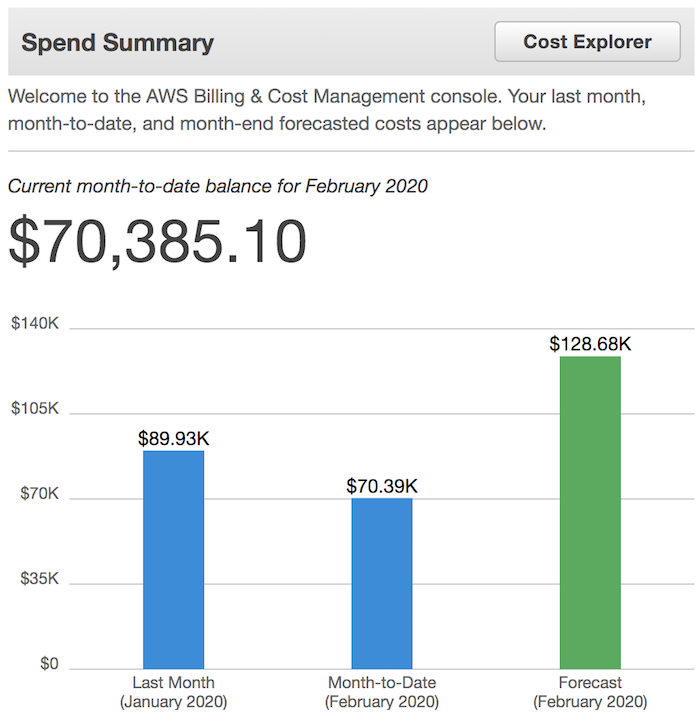
    But as we got rolling and kept adding in more features, our expenses continually climbed. Just look at what I spent in the last month…

    I spent $89,930 on hosting so far in January with an estimated spend of $128,680 for February. But again, let’s stick with January…

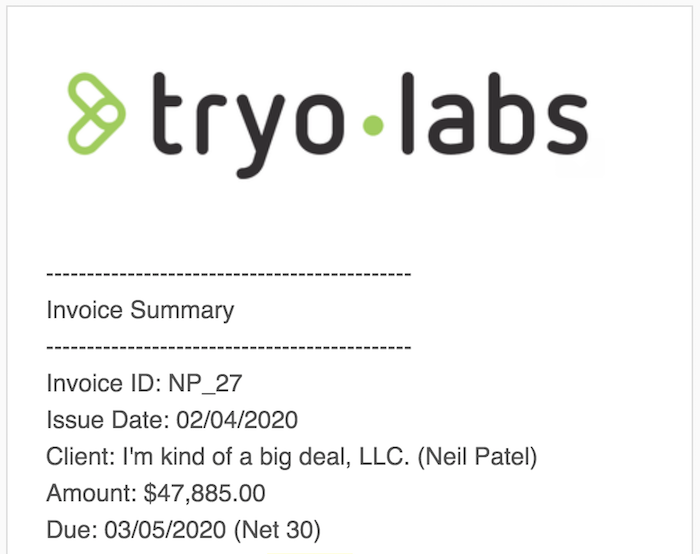
    My back-end development bill from Tryolabs was $47,885 for January.

    My data feed from SEO Power Suite, Data For SEO, and Shared Count totaled $75,253 for January.

    And of course, my front-end developers as well as my dev-ops team Netlabs, which ran me $22,700.

    Then if you add on miscellaneous costs, such as support, design, and project management, I was out another $11,450.

    All in all, I spent $247,218 during the month of January 2020.

    Keep in mind that my costs are continually rising. As the tool gets more popular, it costs me more.

    One of the big reasons for the server expenses is scrapers.

    Believe it or not, a lot of companies are scraping our data and continually rotating up IPs and creating fake accounts, which increases our server expenses. Especially when you consider that they are researching vague SEO terms or domains that aren’t cached in our system.

    Don’t feel bad for me

    Now the purpose of this post wasn’t to make you feel bad or guilty (unless you are scraping me). I just wanted to be transparent about my situation.

    Originally, I was hoping that I could convert a portion of the Ubersuggest customer base into agency clients but as we continually move upstream and work with bigger brands, the conversion rate from an Ubersuggest visitor to a paying consulting customer has been low.

    As that didn’t work out the way I wanted, which I learned around 11 months ago, it became harder and harder for me to eat the costs as they continually grew and I didn’t have a way to pay for them other than to dip into my own savings.

    So, I started searching for solutions, such as turning Ubersuggest into a non-profit and raise money from foundations to help support the cost. I tried that for 5 months and I didn’t gain much traction.

    I also tried to see if I could get sponsors for the tool who would help cover the costs, but that didn’t work out well either. Instead, many of them offered to buy the company for millions of dollars (some in the 8 figures) but I didn’t want to sell it as I knew their goal would be to turn it into another $100-a-month tool, which didn’t sit well with me.

    After running out of options, I had no choice but to make some changes to Ubersuggest (don’t worry it is not closing down). But you can guess what the changes are.

    But don’t worry

    First and foremost, my goal is still to give as much away for free as I can. Within Ubersuggest, you will still be able to do a lot for free…

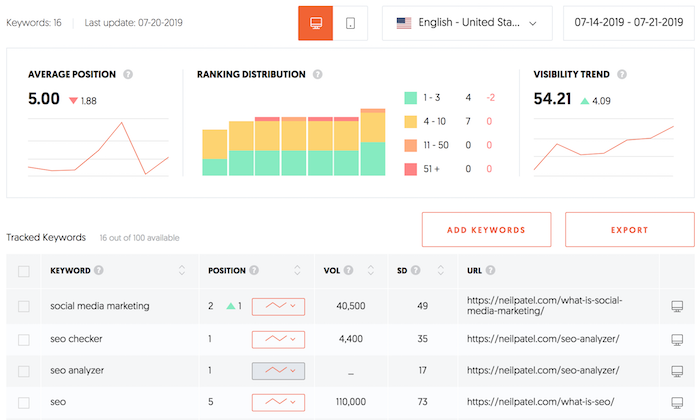
    Creating projects

    You will always be able to create projects and track your rankings. And just like before you always have been limited on the number of keywords you can track and that, of course, is due to costs.

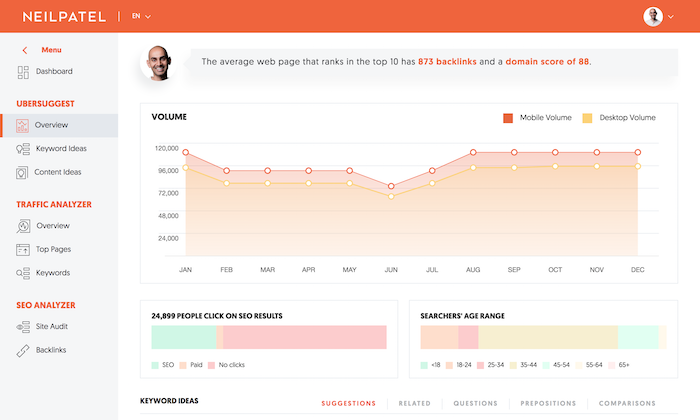
    Keyword research

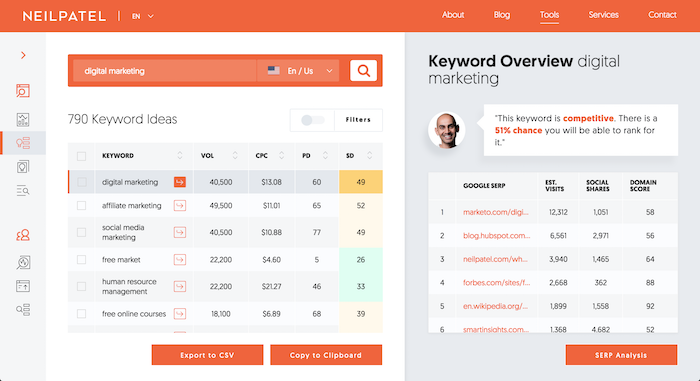
    Within the app, you will still be able to see keyword research data.

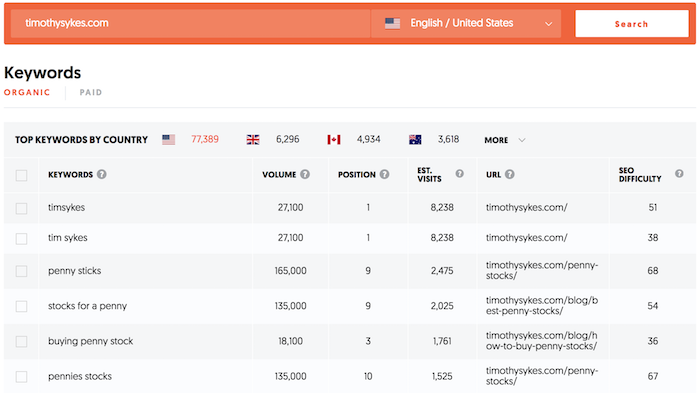
    You’ll see a chart with the latest few months’ traffic volume, data on mobile versus desktop search volume, demographic data, and even keyword recommendations.

    And you can, of course, continually find new keywords to target.

    Sure, some of the data is blocked, but did you know that only 14.3% of people used to register for a free account to unlock that data.

    In other words, most of you never even registered because the application shows you enough for free without needing to log in.

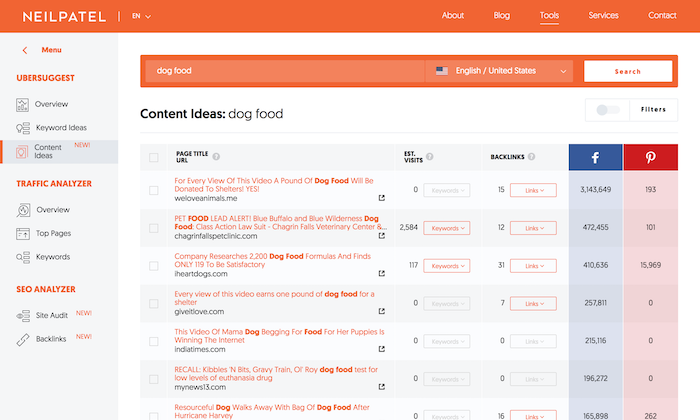
    Content ideas

    Similar to before, you can also see popular blog post suggestions for any given keyword.

    You’ll also be able to see the top keywords a blog post ranks for and the backlinks pointing to that URL.

    Again, keep in mind the majority of you only looked at the top 10 results as 14.3% of you registered for a free account to unlock more data.

    Traffic Analyzer

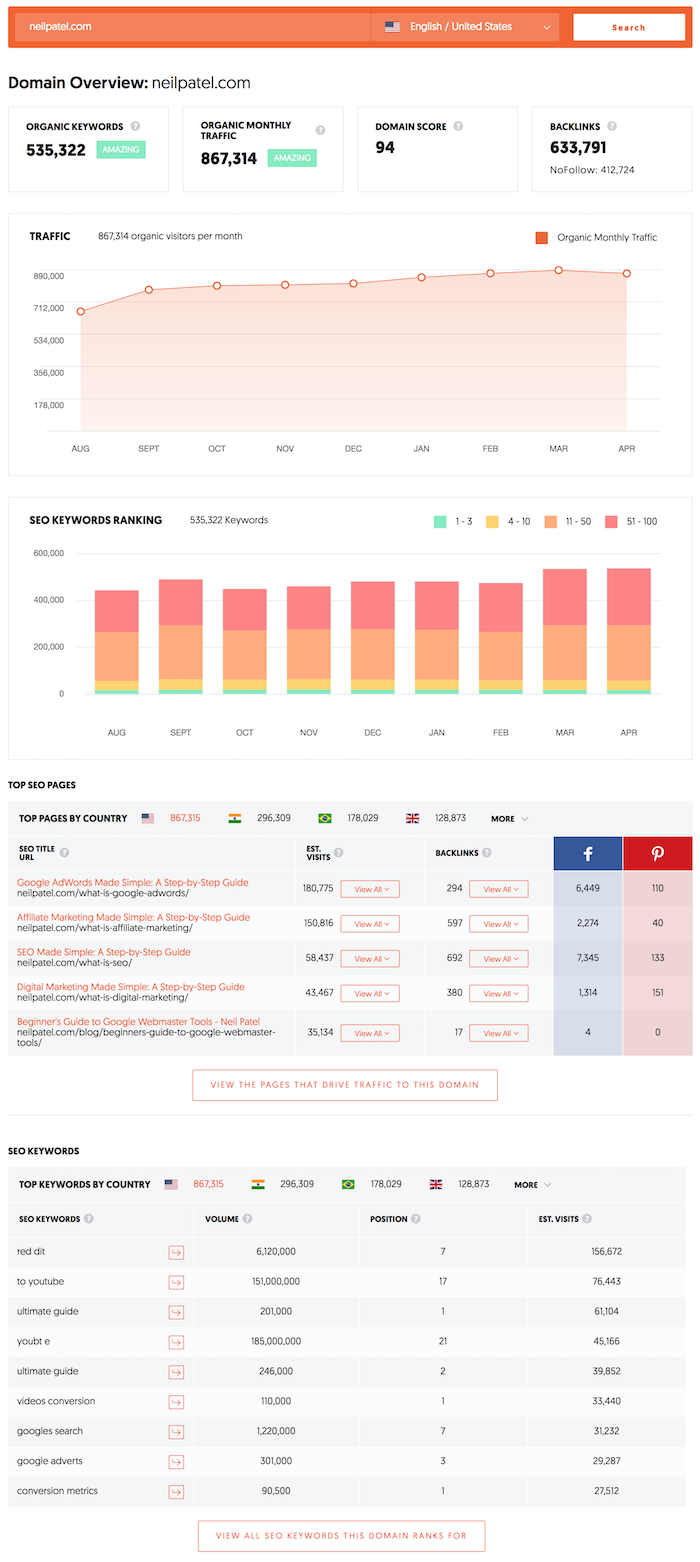
    You will still be able to look up any domain and get stats on it.

    Historical data is blocked, but you can see the last few months which is enough for most of you.

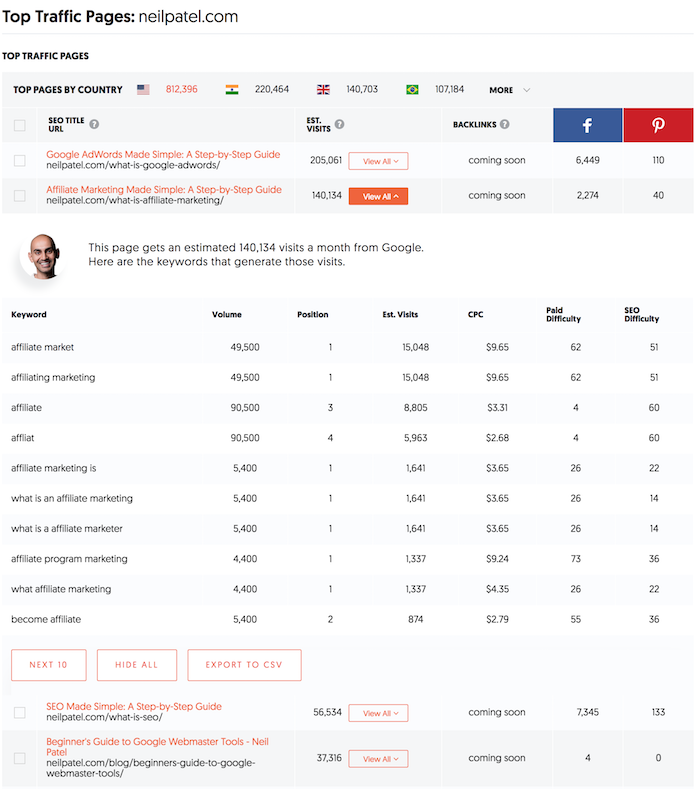
    You’ll also be able to see the top pages for any domain and the keywords that page ranks for as well as backlinks.

    The same goes for the keywords any domain ranks for.

    Some of the data is blocked, but just like before only 14.3% of you registered to view that data. Which means 85.7% of you are happy with the free data.

    SEO Analyzer

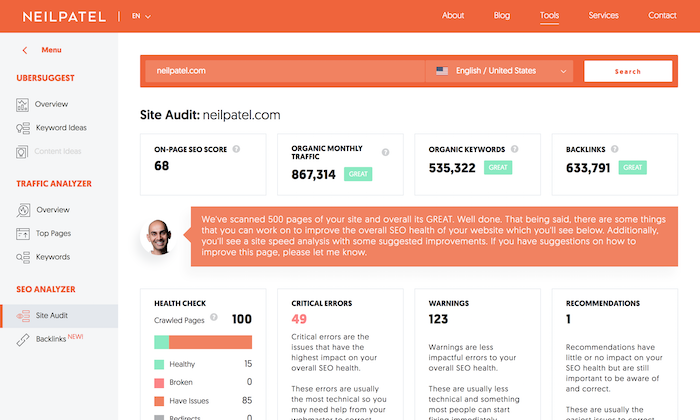
    Not much has changed here, you can still analyze over 100 pages on your site and figure out which errors you have.

    Here’s an interesting fact: Did you know the average site that goes through Ubersuggest only has 48 pages?

    The median number of pages a site has in our system was similar at 43 pages.

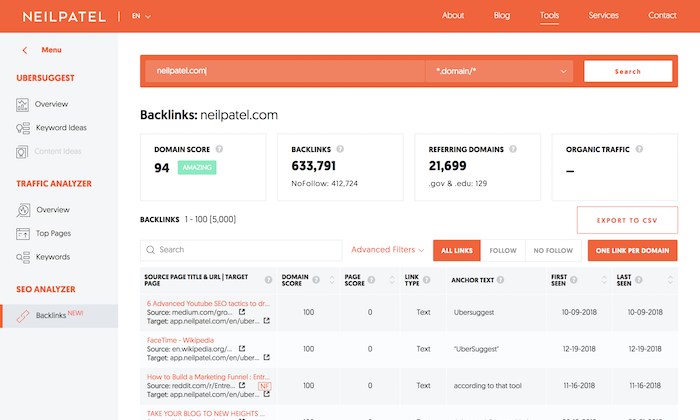
    And of course, there is the backlinks report, which now shows new and lost links as well as historical link growth.
    Similar to what I mentioned above, very few people really cared to see the blocked off information as only 14.3% of you registered.

    My dream

    My goal in life is to help people generate more traffic. And I believe Ubersuggest can get better results and give you a fighting chance.
    I also want to continually make the tool better. For example, why can’t SEO be automated? If you can have self-driving cars, there is no reason why you can’t automate SEO through artificial intelligence and machine learning.

    But with the rising expenses, I was left with 2 options… either shut the tool down (which isn’t an option for me) or figure out a way to cover my expenses.

    In the long run, I can’t keep sustaining the loss of $247,218 a month forever, especially when that number is climbing (that’s roughly 3 million dollars a year).

    My team and I came up with an interesting concept that we think is fair and hopefully, you won’t be upset about it.

    Remember how I said only 14.3% of people register to view more data but 85.7% never register as they were happy with the free data?

    Well, nothing will change for 85.7% of you.

    As for the 14.3% who register to create projects and track keywords, you can still do that for free. But if you want to add more projects or track a lot more keywords, you can upgrade to a paid plan.

    The same goes for keyword research. If you want to view even more data, you can pay for the blocked data. Or if you want to analyze thousands of pages on your site through the site audit, you can also upgrade.

    Don’t worry though, I am still following my original mission.

    I promise to always keep Ubersuggest affordable (and mainly free). I decided to take the Netflix/Amazon approach and try to make the cost super affordable (as my goal is to only break-even).

    On top of that, I made it a 7-day free trial.

    You’ll also find that the pricing varies per country as my costs vary per country. In regions like India and Brazil when someone registers, creates a project and tracks keywords, my expenses are substantially lower than if someone from the United States registers and creates projects and tracks keywords.

    The same goes for labor. My support team in India and other regions costs substantially less than the team in the United States or the United Kingdom.

    If you also pay annually, you’ll get 2 months free so you can save even more money.

    And as I mentioned above, I want to stick to the original mission, which is to help people generate more traffic without having to spend a lot of money.

    There will always be a very generous free plan and I am hoping that I can break even by charging for a portion of the application.

    What’s next?

    Ubersuggest is going to continually get better.

    To make things up to you, over the next month or two I am going to release a Chrome extension that will give you tons of insights for free. And of course, if you want a little bit more you can pay.

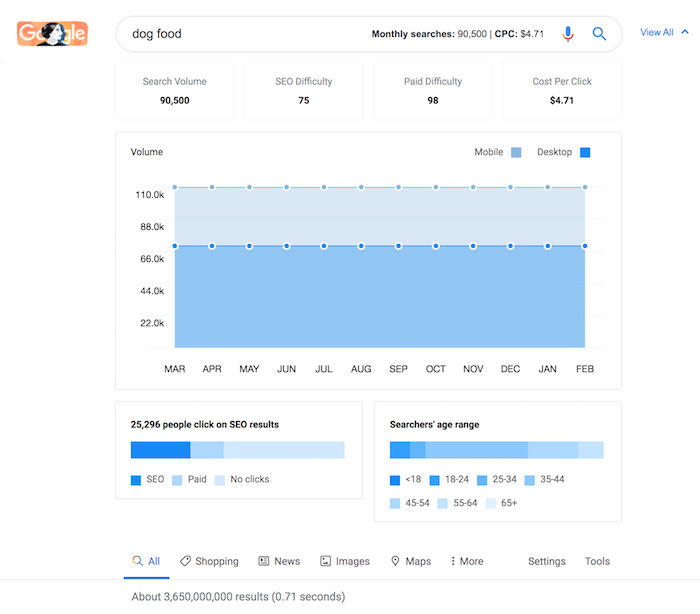
    Here’s what the free extension will look like…

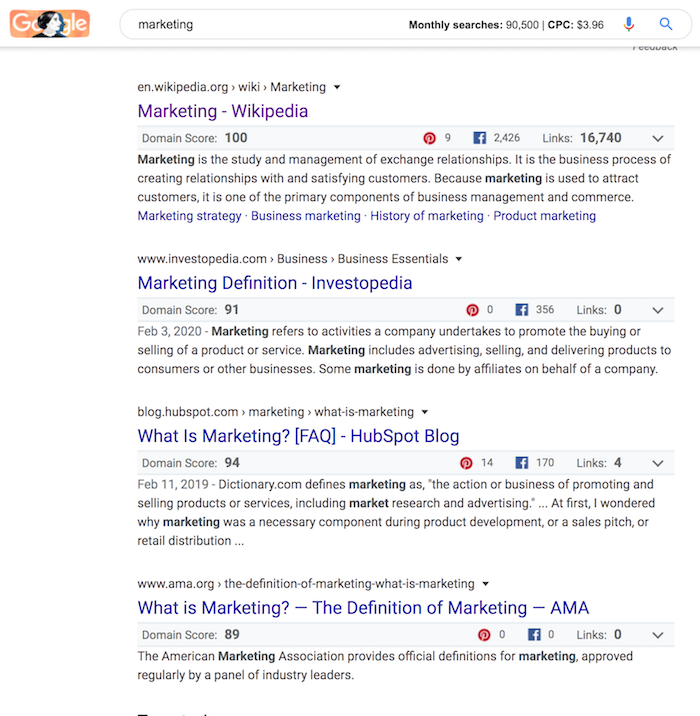
    Whenever you perform a Google search you will be able to see the volume for any search term in any major country. And if you click the “view all” link you will see more data on that keyword.

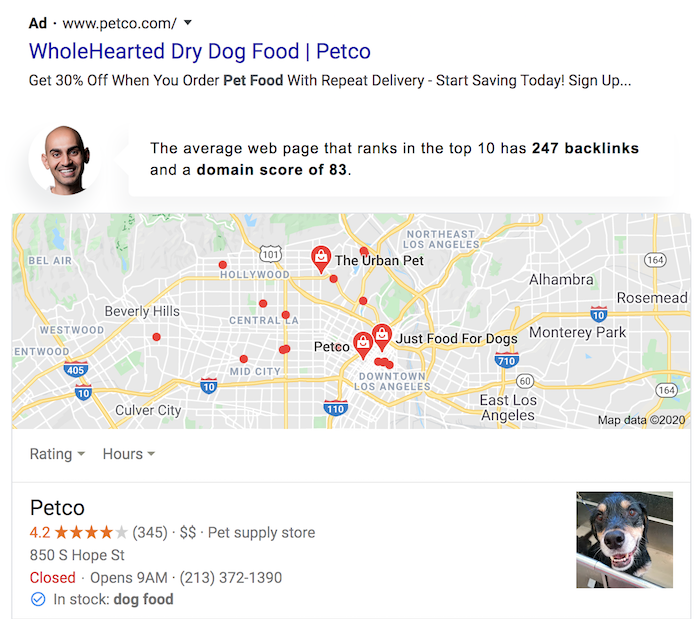
    You’ll also see the average domain score for any given ranking page and the number of links you need to rank in the top 10.

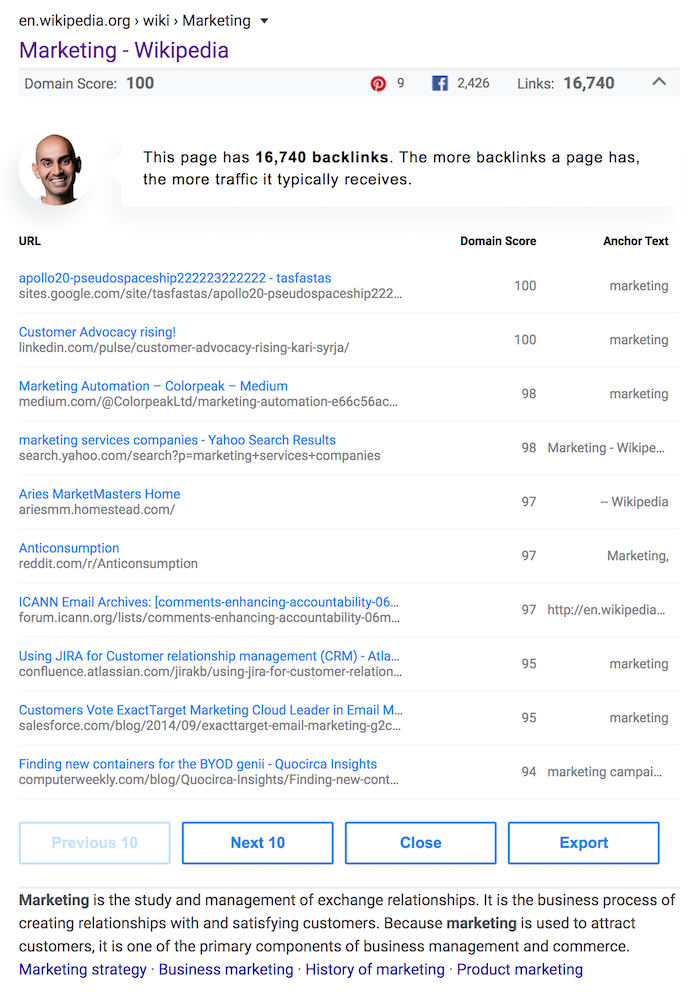
    As you scroll down and go through each of the ranking results, you’ll see the domain score for each URL, social shares, and the backlinks pointing to that search result.

    You can even drill down and see the top links pointing to each URL.

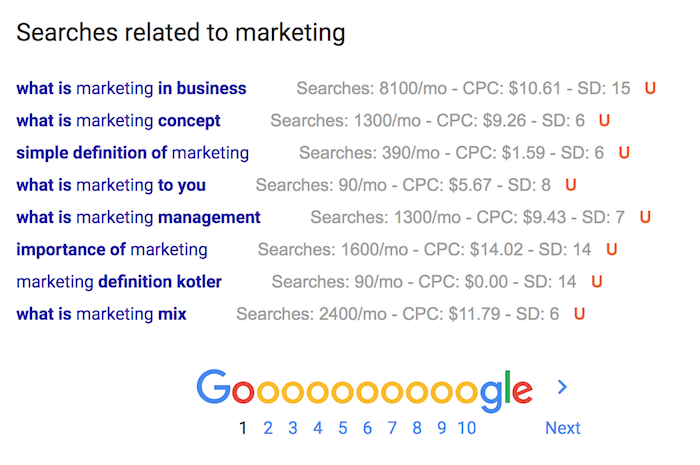
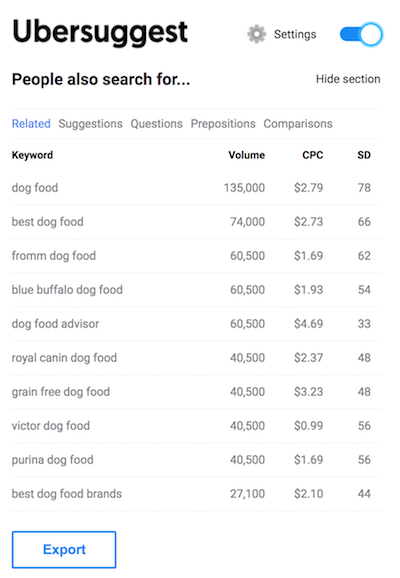
    Now if you head over to the sidebar, you’ll see a list of related keywords as well as data on the top 10 keyword recommendations.

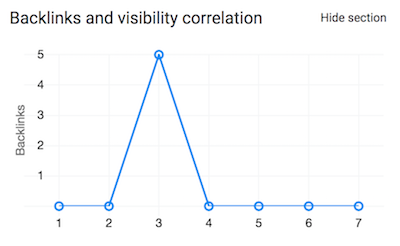
    If you scroll a bit more, you’ll see a graph that shows how many backlinks each result has so that way you can see how many backlinks again you roughly need to rank in the top 10.

    At the very bottom of the search results, you’ll see data on related keywords.

    As time goes on not only will you have the extension, but I will continually add more and more features for free.

    Conclusion

    I’m sorry that I have to start covering my costs, but I hope you understand at the same time.

    From my projections, it will take me roughly 6 months to break even, so I am going to be out a decent amount of money over the next 6 months… but that’s life.

    I am not looking to recuperate my original investment and I don’t mind that being a loss, but once I break even on a monthly basis I will continue to either open up more stuff for free or consider lowering the monthly pricing if possible.

    Again, I am really sorry, but I hope you understand that it isn’t sustainable for me to spend $247,218 a month indefinitely.

    I am open to hearing your thoughts or ideas. I also want to let you know I appreciate everything you have done to support Ubersuggest and my site.

    The post The Future of Ubersuggest appeared first on Neil Patel.


    * This article was originally published here