Tuesday, 17 September 2019

How to Automate Pagespeed Insights For Multiple URLs using Google Sheets

Posted by James_McNulty

Calculating individual page speed performance metrics can help you to understand how efficiently your site is running as a whole. Since Google uses the speed of a site (frequently measured by and referred to as PageSpeed) as one of the signals used by its algorithm to rank pages, it's important to have that insight down to the page level.

One of the pain points in website performance optimization, however, is the lack of ability to easily run page speed performance evaluations en masse. There are plenty of great tools like PageSpeed Insights or the Lighthouse Chrome plugin that can help you understand more about the performance of an individual page, but these tools are not readily configured to help you gather insights for multiple URLs — and running individual reports for hundreds or even thousands of pages isn’t exactly feasible or efficient.

In September 2018, I set out to find a way to gather sitewide performance metrics and ended up with a working solution. While this method resolved my initial problem, the setup process is rather complex and requires that you have access to a server.

Ultimately, it just wasn’t an efficient method. Furthermore, it was nearly impossible to easily share with others (especially those outside of UpBuild).

In November 2018, two months after I published this method, Google released version 5 of the PageSpeed Insights API. V5 now uses Lighthouse as its analysis engine and also incorporates field data provided by the Chrome User Experience Report (CrUX). In short, this version of the API now easily provides all of the data that is provided in the Chrome Lighthouse audits.

So I went back to the drawing board, and I’m happy to announce that there is now an easier, automated method to produce Lighthouse reports en masse using Google Sheets and Pagespeed Insights API v5.

Introducing the Automated PageSpeed Insights Report:

With this tool, we are able to quickly uncover key performance metrics for multiple URLs with just a couple of clicks.

All you’ll need is a copy of this Google Sheet, a free Google API key, and a list of URLs you want data for — but first, let’s take a quick tour.

How to use this tool

The Google Sheet consists of the three following tabs:

  • Settings
  • Results
  • Log

Settings

On this tab, you will be required to provide a unique Google API key in order to make the sheet work.

Getting a Google API Key

  1. Visit the Google API Credentials page.
  2. Choose the API key option from the ‘Create credentials’ dropdown (as shown):

  1. You should now see a prompt providing you with a unique API key:

  1. Next, simply copy and paste that API key into the section shown below found on the “Settings” tab of the Automated Pagespeed Insights spreadsheet.

Now that you have an API key, you are ready to use the tool.

Setting the report schedule

On the Settings tab, you can schedule which day and time that the report should start running each week. As you can see from this screenshot below, we have set this report to begin every Wednesday at 8:00 am. This will be set to the local time as defined by your Google account.

As you can see this setting is also assigning the report to run for the following three hours on the same day. This is a workaround to the limitations set by both Google Apps Scripts and Google PageSpeed API.

Limitations

Our Google Sheet is using a Google Apps script to run all the magic behind the scenes. Each time that the report runs, Google Apps Scripts sets a six-minute execution time limit, (thirty minutes for G Suite Business / Enterprise / Education and Early Access users).

In six minutes you should be able to extract PageSpeed Insights for around 30 URLs.

Then you’ll be met with the following message:

In order to continue running the function for the rest of the URLs, we simply need to schedule the report to run again. That is why this setting will run the report again three more times in the consecutive hours, picking up exactly where it left off.

The next hurdle is the limitation set by Google Sheets itself.

If you’re doing the math, you’ll see that since we can only automate the report a total of four times — we theoretically will be only able to pull PageSpeed Insights data for around 120 URLs. That’s not ideal if you're working with a site that has more than a few hundred pages!.

The schedule function in the Settings tab uses the Google Sheet’s built-in Triggers feature. This tells our Google Apps script to run the report automatically at a particular day and time. Unfortunately, using this feature more than four times causes the “Service using too much computer time for one day” message.

This means that our Google Apps Script has exceeded the total allowable execution time for one day. It most commonly occurs for scripts that run on a trigger, which have a lower daily limit than scripts executed manually.

Manually?

You betcha! If you have more than 120 URLs that you want to pull data for, then you can simply use the Manual Push Report button. It does exactly what you think.

Manual Push Report

Once clicked, the ‘Manual Push Report’ button (linked from the PageSpeed Menu on the Google Sheet) will run the report. It will pick up right where it left off with data populating in the fields adjacent to your URLs in the Results tab.

For clarity, you don’t even need to schedule the report to run to use this document. Once you have your API key, all you need to do is add your URLs to the Results tab (starting in cell B6) and click ‘Manual Push Report’.

You will, of course, be met with the inevitable “Exceed maximum execution time” message after six minutes, but you can simply dismiss it, and click “Manual Push Report” again and again until you’re finished. It’s not fully automated, but it should allow you to gather the data you need relatively quickly.

Setting the log schedule

Another feature in the Settings tab is the Log Results function.

This will automatically take the data that has populated in the Results tab and move it to the Log sheet. Once it has copied over the results, it will automatically clear the populated data from the Results tab so that when the next scheduled report run time arrives, it can gather new data accordingly. Ideally, you would want to set the Log day and time after the scheduled report has run to ensure that it has time to capture and log all of the data.

You can also manually push data to the Log sheet using the ‘Manual Push Log’ button in the menu.

How to confirm and adjust the report and log schedules

Once you’re happy with the scheduling for the report and the log, be sure to set it using the ‘Set Report and Log Schedule’ from the PageSpeed Menu (as shown):

Should you want to change the frequency, I’d recommend first setting the report and log schedule using the sheet.

Then adjust the runLog and runTool functions using Google Script Triggers.

  • runLog controls when the data will be sent to the LOG sheet.
  • runTool controls when the API runs for each URL.

Simply click the pencil icon next to each respective function and adjust the timings as you see fit.

You can also use the ‘Reset Schedule’ button in the PageSpeed Menu (next to Help) to clear all scheduled triggers. This can be a helpful shortcut if you’re simply using the interface on the ‘Settings’ tab.

PageSpeed results tab

This tab is where the PageSpeed Insights data will be generated for each URL you provide. All you need to do is add a list of URLs starting from cell B6. You can either wait for your scheduled report time to arrive or use the ‘Manual Push Report’ button.

You should now see the following data generating for each respective URL:

  • Time to Interactive
  • First Contentful Paint
  • First Meaningful Paint
  • Time to First Byte
  • Speed Index

You will also see a column for Last Time Report Ran and Status on this tab. This will tell you when the data was gathered, and if the pull request was successful. A successful API request will show a status of “complete” in the Status column.

Log tab

Logging the data is a useful way to keep a historical account on these important speed metrics. There is nothing to modify in this tab, however, you will want to ensure that there are plenty of empty rows. When the runLog function runs (which is controlled by the Log schedule you assign in the “Settings” tab, or via the Manual Push Log button in the menu), it will move all of the rows from the Results tab that contains a status of “complete”. If there are no empty rows available on the Log tab, it will simply not copy over any of the data. All you need to do is add several thousands of rows depending on how often you plan to check-in and maintain the Log.

How to use the log data

The scheduling feature in this tool has been designed to run on a weekly basis to allow you enough time to review the results, optimize, then monitor your efforts. If you love spreadsheets then you can stop right here, but if you’re more of a visual person, then read on.

Visualizing the results in Google Data Studio

You can also use this Log sheet as a Data Source in Google Data Studio to visualize your results. As long as the Log sheet stays connected as a source, the results should automatically publish each week. This will allow you to work on performance optimization and evaluate results using Data Studio easily, as well as communicate performance issues and progress to clients who might not love spreadsheets as much as you do.

Blend your log data with other data sources

One great Google Data Studio feature is the ability to blend data. This allows you to compare and analyze data from multiple sources, as long as they have a common key. For example, if you wanted to blend the Time to Interactive results against Google Search Console data for those same URLs, you can easily do so. You will notice that the column in the Log tab containing the URLs is titled “Landing Page”. This is the same naming convention that Search Console uses and will allow Data Studio to connect the two sources.

There are several ways that you can use this data in Google Data Studio.

Compare your competitors’ performance

You don’t need to limit yourself to just your own URLs in this tool; you can use any set of URLs. This would be a great way to compare your competitor's pages and even see if there are any clear indicators of speed affecting positions in Search results.

Improve usability

Don’t immediately assume that your content is the problem. Your visitors may not be leaving the page because they don’t find the content useful; it could be slow load times or other incompatibility issues that are driving visitors away. Compare bounce rates, time on site, and device type data alongside performance metrics to see if it could be a factor.

Increase organic visibility

Compare your performance data against Search ranking positions for your target keywords. Use a tool to gather your page positions, and fix performance issues for landing pages on page two or three of Google Search results to see if you can increase their prominence.

Final thoughts

This tool is all yours.

Make a copy and use it as is, or tear apart the Google Apps Script that makes this thing work and adapt it into something bigger and better (if you do, please let me know; I want to hear all about it).

Remember PageSpeed Insights API V5 now includes all of the same data that is provided in the Chrome Lighthouse audits, which means there are way more available details you can extract beyond the five metrics that this tool generates.

Hopefully, for now, this tool helps you gather Performance data a little more efficiently between now and when Google releases their recently announced Speed report for Search Console.


Sign up for The Moz Top 10, a semimonthly mailer updating you on the top ten hottest pieces of SEO news, tips, and rad links uncovered by the Moz team. Think of it as your exclusive digest of stuff you don't have time to hunt down but want to read!


* This article was originally published here

Monday, 16 September 2019

10 Link Building Lies You Must Ignore

Posted by David_Farkas

Even though link building has been a trade for more than a decade, it’s clear that there is still an enormous amount of confusion around it.

Every so often, there is a large kerfuffle. Some of these controversies and arguments arise simply from a necessity to fill a content void, but some of them arise from genuine concern and confusion:

“Don’t ask for links!”

“Stick a fork in it, guest posting is done!”

“Try to avoid link building!”

SEO is an everchanging industry; what worked yesterday might not work today. Google’s personnel doesn’t always help the cause. In fact, they often add fuel to the fire. That’s why I want to play the role of “link building myth-buster” today. I’ve spent over ten years in link building, and I’ve seen it all.

I was around for Penguin, and every iteration since. I was around for the launch of Hummingbird. And I was even around for the Matt Cutts videos.

So, if you’re still confused about link building, read through to have ten of the biggest myths in the business dispelled.

1. If you build it, they will come

There is a notion among many digital marketers and SEOs that if you simply create great content and valuable resources, the users will come to you. If you’re already a widely-recognized brand/website, this can be a true statement. If, however, you are like the vast majority of websites — on the outside looking in — this could be a fatal mindset.

In order to get people to find you, you have to build the roads that will lead them to where you want. This is where link building comes in.

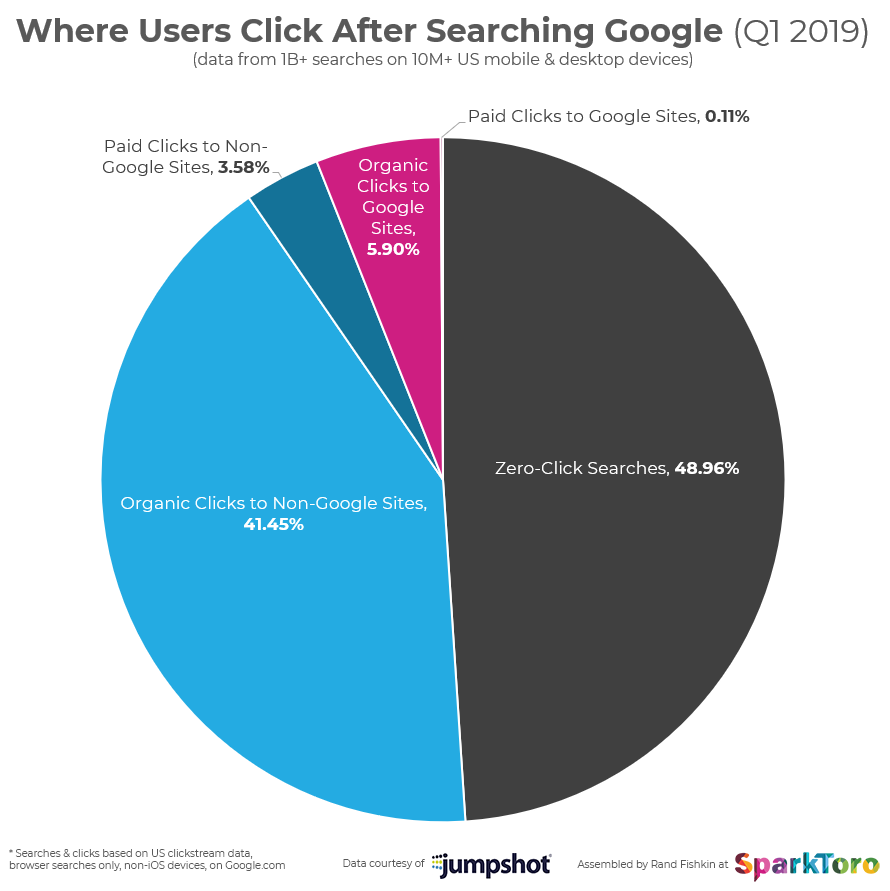
A majority of people searching Google end up clicking on organic results. In fact, for every click on a paid result in Google, there are 11.6 clicks to organic results!


And in order to build your rankings in search engines, you need links.

Which brings me to our second myth around links.

2. You don’t need links to rank

I can’t believe that there are still people who think this in 2019, but there are. That’s why I recently published a case study regarding a project I was working on.

To sum it up briefly, the more authoritative, relevant backlinks I was able to build, the higher the site ranked for its target keywords. This isn’t to say that links are the only factor in Google’s algorithm that matters, but there’s no doubt that a robust and relevant backlink profile goes a long way.

3. Only links with high domain authority matter

As a link builder, you should definitely seek target sites with high metrics. However, they aren’t the only prospects that should matter to you.

Sometimes a low domain authority (DA) might just be an indication that it is a new site. But forget about the metrics for one moment. Along with authority, relevancy matters. If a link prospect is perfectly relevant to your website, but it has a low DA, you should still target it. In fact, most sites that will be so relevant to yours will likely not have the most eye-popping metrics, and that is precisely because they are so niche. But more often than not, relevancy is more important than DA.

When you focus solely on metrics, you will lose out on highly relevant opportunities. A link that sends trust signals is more valuable than a link that has been deemed important by metrics devised by entities other than Google.

Another reason why is because Google’s algorithm looks for diversity in your backlink profile. You might think that a profile with over 100 links, all of which have a 90+ DA would be the aspiration. In fact, Google will look at it as suspect. So while you should absolutely target high DA sites, don’t neglect the “little guys.”

4. You need to build links to your money pages

When I say “money pages,” I mean the pages where you are specifically looking to convert, whether its users into leads or leads into sales.

You would think that if you’re going to put in the effort to build the digital highways that will lead traffic to your website, you would want all of that traffic to find these money pages, right?

In reality, though, you should take the exact opposite approach. First off, approaching sites that are in your niche and asking them to link to your money pages will come off as really spammy/aggressive. You’re shooting yourself in the foot.

But most importantly, these money pages are usually not pages that have the most valuable information. Webmasters are much more likely to link to a page with resourceful information or exquisitely created content, not a page displaying your products or services.

Building links to your linkable assets (more on that in a second) will increase your chances of success and will ultimately raise the profile of your money pages in the long run as well.

5. You have to create the best, most informative linkable asset

If you’re unfamiliar with what a linkable asset is exactly, it’s a page on your website designed specifically to attract links/social shares. Assets can come in many forms: resource pages, funny videos, games, etc.

Of course, linkable assets don’t grow on trees, and the process of coming up with an idea for a valuable linkable asset won’t be easy. This is why some people rely on “the skyscraper technique.” This is when you look at the linkable assets your competitors have created, you choose one, and you simply try to outdo it with something bigger and better.

This isn’t a completely ineffective technique, but you shouldn’t feel like you have to do this.

Linkable assets don’t need to be word-heavy “ultimate guides” or heavily-researched reports. Instead of building something that really only beats your competitor’s word count, do your own research and focus on building an authoritative resource that people in your niche will be interested in.

The value of a linkable asset has much more to do with finding the right angle and the accuracy of the information you’re providing than the amount.

6. The more emails you send, the more links you will get

I know several SEOs who like to cast a wide net — they send out emails to anyone and every one that even has the tiniest bit of relevancy of authority within their niche. It’s an old sales principle: The idea that more conversations will lead to more purchases/conversions. And indeed in sales, this is usually going to be the case. 

In link building? Not so much.

This is because, in link building, your chances of getting someone to link to you are increased when the outreach you send is more thoughtful/personalized. Webmasters pore over emails on top of emails on top of emails, so much so that it’s easy to pass over the generic ones.

They need to be effectively persuaded as to the value of linking to your site. If you choose to send emails to any site with a pulse, you won’t have time to create specific outreach for each valuable target site.

7. The only benefit of link building is algorithmic

As I mentioned earlier, links are fundamental to Google’s algorithm. The more quality backlinks you build, the more likely you are to rank for your target keywords in Google.

This is the modus operandi for link building. But it is not the only reason to build links. In fact, there are several non-algorithmic benefits which link building can provide.

First off, there’s brand visibility. Link building will make you visible not only to Google in the long term but to users in the immediate term. When a user comes upon a resource list with your link, they aren’t thinking about how it benefits your ranking in Google; they just might click your link right then and there.

Link building can also lead to relationship building. Because of link building’s very nature, you will end up conversing with many potential influencers and authority figures within your niche. These conversations don’t have to end as soon as they place your link.

In fact, if the conversations do end there every time, you’re doing marketing wrong. Take advantage of the fact that you have their attention and see what else you can do for each other.

8. You should only pursue exact match anchors

Not all myths are born out of complete and utter fiction. Some myths persist because they have an element of truth to them or they used to be true. The use of exact match anchor text is such a myth.

In the old days of SEO/link building, one of the best ways to get ahead was to use your target keywords/brand name as the anchor text for your backlinks. Keyword stuffing and cloaking were particularly effective as well.

But times have changed in SEO, and I would argue mostly for the better. When Google sees a backlink profile that uses only a couple of variations of anchor text, you are now open to a penalty. It’s now considered spammy. To Google, it does not look like a natural backlink profile.

As such, it’s important to note now that the quality of the link itself is far more important than the anchor text that comes with it.

It really should be out of your hands anyway. When you’re link building the right way, you are working in conjunction with the webmasters who are publishing your link. You do not have 100 percent control of the situation, and the webmaster will frequently end up using the anchor text of their choice.

So sure, you should optimize your internal links with optimized anchor text when possible, but keep in mind that it is best to have diverse anchor text distribution.

9. Link building requires technical abilities

Along with being a link builder, I am also an employer. When hiring other link builders, one skepticism I frequently come across relates to technical skills. Many people who are unfamiliar with link building think that it requires coding or web development ability.

While having such abilities certainly won’t hurt you in your link building endeavors, I’m here to tell you that they aren’t at all necessary. Link building is more about creativity, communication, and strategy than it is knowing how to write a for loop in javascript.

If you have the ability to effectively persuade, create valuable content, or identify trends, you can build links.

10. All follow links provide equal value

Not all links are created equally, and I’m not even talking about the difference between follow links and no-follow links. Indeed, there are distinctions to be made among just follow links.

Let’s take .edu links, for example. These links are some of the most sought after for link builders, as they are thought to carry inordinate power. Let’s say you have two links from the same .edu website. They are both on the same domain, same authority, but they are on different pages. One is on the scholarship page, the other is on a professor’s resource page which has been carefully curated.

They are both do-follow links, so naturally, they should both carry the same weight, right?

Fail. Search engines are smart enough to know the difference between a hard-earned link and a link that just about anyone can submit to.

Along with this, the placement of a link on a page matters. Even if two links are on the exact same page (not just the same domain) a link that is above-the-fold (a link you can see without scrolling) will carry more weight.

Conclusion

Link building and SEO are not rocket science. There’s a lot of confusion out there, thanks mainly to the fact that Google’s standards change rapidly and old habits die hard, and the answers and strategies you seek aren’t always obvious.

That said, the above points are some of the biggest and most pervasive myths in the industry. Hopefully, I was able to clear them up for you.


Sign up for The Moz Top 10, a semimonthly mailer updating you on the top ten hottest pieces of SEO news, tips, and rad links uncovered by the Moz team. Think of it as your exclusive digest of stuff you don't have time to hunt down but want to read!


* This article was originally published here

Sunday, 15 September 2019

Refurbishing Top Content - Best of Whiteboard Friday

Posted by BritneyMuller

You've got top-performing content on your site that does really well. Maybe it's highly converting, maybe it garners the most qualified traffic — but it's just sitting there gathering dust. Isn't there something else you can do with content that's clearly proven its worth?

As it turns out, there is! In this ever-popular episode of Whiteboard Friday, Moz's Senior SEO Scientist, Britney Muller, shares three easy steps for identifying, repurposing, and republishing your top content to juice every drop of goodness out of it.

Click on the whiteboard image above to open a high-resolution version in a new tab!

Video Transcription

Hey, Moz fans, welcome to another edition of Whiteboard Friday. I'm Britney Muller, Moz's SEO and Content Architect, and I'm so excited to talk to you today about refurbishing your top content. Any of you watching likely have top content, either on your site or a client's site, that does really, really well. Whether that's getting the most traffic or converting the most users, it does really well. The problem is that we let it just sit there, and we're not getting the amplification that we could out of that content. So I'm going to talk to you today about how to sort of funnel in more qualified leads. So how do we do that?

Step 1: Identify your site's top traffic pages.

Analytics is so great for this and to further evaluate which of those pages are converting the highest, have the most engagements, and are bringing in most of your traffic.

It's super important to keep in mind that there are other forms of content. It's not always necessarily just a page on your website. It could be a video somewhere, it could be a really great podcast, it could even be a printout, and I've run into this a few times where the information isn't currently digital, but they use it in a clinic or in an office setting that could do really great things for the website. So keep that in mind.

Step 2: Simplify and repurpose

For the sake of our example, I'm going with a long-form content of how to choose the right college. Maybe this brings in lots of applicants for a particular school or university. So what could they better be doing with this piece of content? So that brings us to step two, which is simplify and repurpose. We all want to consume information differently. There are different use cases, you name it. So to take a long-form piece of content and to put it together in a PowerPoint, really simplify it and break it up into slides. From there, you can use those slides or take new raw footage to make a really, really powerful video on how to choose the right college.

If you have these two steps done, you're kind of set up for success for images. You could either take images from your PowerPoint or your video and have really great informational text below it.

Lastly, audio, how easy would it be to take this long-form piece and to make it into an audio option or a podcast even, allowing your visitors maybe another option when they get to this page? So it's fun to experiment with that as well.

You can interweave some of these other forms of content back into the original piece, and now you're learning a lot more about your audience and a lot more about how they want to consume your content.

Step 3: Publish on popular platforms

I can already feel people getting really squeamish about this, but you shouldn't. Let me say there are two big reasons why you should be taking advantage of this. One, these are all really, really powerful sites. They rank really well. Two, they have a huge audience, and their audiences are actively seeking information that you're providing on your site. So if you're not going to be providing expertise and information on these sites, someone will, right? So you want to take advantage of that, and you want to take the opportunity.

So you could take your PowerPoint and upload it to SlideShare. SlideShare ranks so, so well. You could take your video and upload it to YouTube, with the caveat of putting it on Vimeo or Wistia first. You want to make sure that you are self-hosting for up to three months, and then you can transfer your video to YouTube. That way you're getting the authority of that video, and Youtube.com isn't ranking first for it.

Instagram is great for those images, but, again, I would always put the text below it and keep your images really clean and not have too much text on them, and then to obviously hashtag appropriately.

Then Pinterest, Quora, people are actively asking questions that you have all the answers to, so to be the expertise in the field and to take advantage of people asking, "How do I choose the right college?" Reddit and LinkedIn are other options to further amplify.

Step 4: Measure the referral metrics

Measure the impact of republishing on these sites. There are a couple of ways to do this. These are some of my favorite engagement metrics. So you have number of viewed pages, you have time on site, bounce rate is always good to look at, and, obviously, conversions. So this really starts to paint a picture of: Where are you seeing the qualified leads? Where is your qualified traffic coming from?

Then the next time you go to a new content strategy, maybe you leave out these three because you didn't get much traffic from them, but maybe you saw a bunch of qualified leads from SlideShare. So that brings you to pivot, like the "Friends" episode. It allows you to pivot.

So now, we have a strategy moving forward. We know what platforms work best for your website or your business, and you're kind of setting yourself up for success down the road.

I would love, love, love to hear if you have experimented with these strategies, what has worked for you, what hasn't. Also feel free to ask me any questions down below. Thank you so much for joining us for this edition of Whiteboard Friday, and I will see all again soon. Thank you.

Video transcription by Speechpad.com


Sign up for The Moz Top 10, a semimonthly mailer updating you on the top ten hottest pieces of SEO news, tips, and rad links uncovered by the Moz team. Think of it as your exclusive digest of stuff you don't have time to hunt down but want to read!


* This article was originally published here

Saturday, 14 September 2019

An Agency Workflow for Google My Business Dead Ends

Posted by MiriamEllis

There are times when your digital marketing agency will find itself serving a local business with a need for which Google has made no apparent provisions. Unavailable categories for unusual businesses come instantly to mind, but scenarios can be more complex than this.

Client workflows can bog down as you worry over what to do, fearful of making a wrong move that could get a client’s listing suspended or adversely affect its rankings or traffic. If your agency has many employees, an entry-level SEO could be silently stuck on an issue, or even doing the wrong thing because they don’t know how or where to ask the right questions.

The best solution I know of consists of a combination of:

  • Client contracts that are radically honest about the nature of Google
  • Client management that sets correct expectations about the nature of Google
  • A documented process for seeking clarity when unusual client scenarios arise
  • Agency openness to experimentation, failure, and on-going learning
  • Regular monitoring for new Google developments and changes
  • A bit of grit

Let’s put the fear of often-murky, sometimes-unwieldy Google on the back burner for a few minutes and create a proactive process your team can use when hitting what feels like procedural dead end on the highways and byways of local search.

The apartment office conundrum

As a real-world example of a GMB dead end, a few months ago, I was asked a question about on-site offices for apartment complexes. The details:

  • Google doesn’t permit the creation of listings for rental properties but does allow such properties to be listed if they have an on-site office, as many apartment complexes do.
  • Google’s clearest category for this model is “apartment complex”, but the brand in question was told by Google (at the time) that if they chose that category, they couldn’t display their hours of operation.
  • This led the brand I was advising to wonder if they should use “apartment rental agency” as their category because it does display hours. They didn’t want to inconvenience the public by having them arrive at a closed office after hours, but at the same time, they didn’t want to misrepresent their category.

Now that’s a conundrum!

When I was asked to provide some guidance to this brand, I went through my own process of trying to get at the heart of the matter. In this post, I’m going to document this process for your agency as fully as I can to ensure that everyone on your team has a clear workflow when puzzling local SEO scenarios arise.

I hope you’ll share this article with everyone remotely involved in marketing your clients, and that it will prevent costly missteps, save time, move work forward, and support success.

Step 1: Radical honesty sets the stage right

Whether you’re writing a client contract, holding a client onboarding meeting, or having an internal brand discussion about local search marketing, setting correct expectations is the best defense against future disappointments and disputes. Company leadership must task itself with letting all parties know:

  1. Google has a near-monopoly on search. As such, they can do almost anything they feel will profit them. This means that they can alter SERPs, change guidelines, roll out penalties and filters, monetize whatever they like, and fail to provide adequate support to the public that makes up and interacts with the medium of their product. There is no guarantee any SEO can offer about rankings, traffic, or conversions. Things can change overnight. That’s just how it is.
  2. While Google’s monopoly enables them to be whimsical, brands and agencies do not have the same leeway if they wish to avoid negative outcomes. There are known practices which Google has confirmed as contrary to their vision of search (buying links, building listings for non-existent locations, etc.). Client and agency agree not to knowingly violate Google’s guidelines. These guidelines include:

Don’t accept work under any other conditions than that all parties understand Google’s power, unpredictability, and documented guidelines. Don’t work with clients, agencies, software providers, or others that violate guidelines. These basic rules set the stage for both client and agency success.

Step 2: Confirm that the problem really exists

When a business believes it is encountering an unusual local search marketing problem, the first task of the agency staffer is to vet the issue. The truth is, clients sometimes perceive problems that don’t really exist. In my case of the apartment complex, I took the following steps.

  1. I confirmed the problem. I observed the lacking display of hours of operation on GMB listings using the “apartment complex” category.
  2. I called half-a-dozen nearby apartment complex offices and asked if they were open either by appointment only, or 24/7. None of them were. At least in my corner of the world, apartment complex offices have set, daily business hours, just like retail, opening in the AM and closing in the PM each day.
  3. I did a number of Google searches for “apartment rental agency” and all of the results Google brought up were for companies that manage rentals city-wide — not rentals of units within a single complex.

So, I was now convinced that the business was right: they were encountering a real dead end. If they categorized themselves as an “apartment complex”, their missing hours could inconvenience customers. If they chose the “apartment rental agency” designation to get hours to display, they could end up fielding needless calls from people looking for city-wide rental listings. The category would also fail to be strictly accurate.

As an agency worker, be sure you’ve taken common-sense steps to confirm that a client’s problem is, indeed, real before you move on to next steps.

Step 3: Search for a similar scenario

As a considerate agency SEO, avoid wasting the time of project leads, managers, or company leadership by first seeing if the Internet holds a ready answer to your puzzle. Even if a problem seems unusual, there’s a good chance that somebody else has already encountered it, and may even have documented it. Before you declare a challenge to be a total dead-end, search the following resources in the following order:

  1. Do a direct search in Google with the most explicit language you can (e.g. “GMB listing showing wrong photo”, “GMB description for wrong business”, “GMB owner responses not showing”). Click on anything that looks like it might contain an answer, look at the date on the entry, and see what you can learn. Document what you see.
  2. Go to the Google My Business Help Community forum and search with a variety of phrases for your issue. Again, note the dates of responses for the currency of advice. Be aware that not all contributors are experts. Looks for thread responses from people labeled Gold Product Expert; these members have earned special recognition for the amount and quality of what they contribute to the forum. Some of these experts are widely-recognized, world-class local SEOs. Document what you learn, even if means noting down “No solution found”.
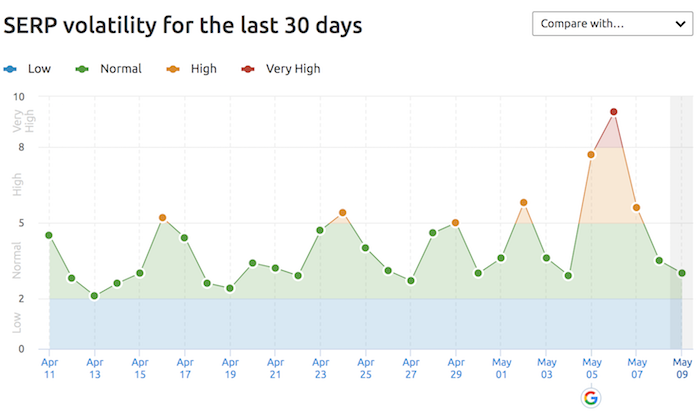
  3. Often, a peculiar local search issue may be the result of a Google change, update, or bug. Check the MozCast to see if the SERPs are undergoing turbulent weather and Sterling Sky’s Timeline of Local SEO Changes. If the dates of a surfaced issue correspond with something appearing on these platforms, you may have found your answer. Document what you learn.
  4. Check trusted blogs to see if industry experts have written about your issue. The nice thing about blogs is that, if they accept comments, you can often get a direct response from the author if something they’ve penned needs further clarification. For a big list of resources, see: Follow the Local SEO Leaders: A Guide to Our Industry’s Best Publications. Document what you learn.

    If none of these tactics yields a solution, move on to the next step.

    Step 4: Speak up for support

    If you’ve not yet arrived at an answer, it’s time to reach out. Take these steps, in this order:

    1) Each agency has a different hierarchy. Now is the time to reach out to the appropriate expert at your business, whether that’s your manager or a senior-level local search expert. Clearly explain the issue and share your documentation of what you’ve learned/failed to learn. See if they can provide an answer.

    2) If leadership doesn’t know how to solve the issue, request permission to take it directly to Google in private. You have a variety of options for doing so, including:

    In the case of the apartment complex, I chose to reach out via Twitter. Responses can take a couple of days, but I wasn’t in a hurry. They replied:

    As I had suspected, Google was treating apartment complexes like hotels. Not very satisfactory since the business models are quite different, but at least it was an answer I could document. I’d hit something of a dead-end, but it was interesting to consider Google’s advice about using the description field to list hours of operation. Not a great solution, but at least I would have something to offer the client, right from the horse’s mouth.

    In your case, be advised that not all Google reps have the same level of product training. Hopefully, you will receive some direct guidance on the issue if you describe it well and can document Google’s response and act on it. If not, keep moving.

    3) If Google doesn’t respond, responds inexpertly, or doesn’t solve your problem, go back to your senior-level person. Explain what happened and request advice on how to proceed.

    4) If the senior staffer still isn’t certain, request permission to publicly discuss the issue (and the client). Head to supportive fora. If you’re a Moz Pro customer, feel free to post your scenario in the Moz Q&A forum. If you’re not yet a customer, head to the Local Search Forum, which is free. Share a summary of the challenge, your failure to find a solution, and ask the community what they would do, given that you appear to be at a dead end. Document the advice you receive, and evaluate it based on the expertise of respondents.

    Step 5: Make a strategic decision

    At this point in your workflow, you’ve now:

    • Confirmed the issue
    • Searched for documented solutions
    • Looked to leadership for support
    • Looked to Google for support
    • Looked to the local SEO industry for support

    I’m hoping you’ve arrived at a strategy for your client’s scenario by now, but if not, you have 3 things left to do.

    1. Take your entire documentation back to your team/company leader. Ask them to work with you on an approved response to the client.
    2. Take that response to the client, with a full explanation of any limitations you encountered and a description of what actions your agency wants to take. Book time for a thorough discussion. If what you are doing is experimental, be totally transparent about this with the client.
    3. If the client agrees to the strategy, enact it.

    In the case of the apartment complex, there were several options I could have brought to the client. One thing I did recommend is that they do an internal assessment of how great the risk really was of the public being inconvenienced by absent hours.

    How many people did they estimate would stop by after 5 PM in a given month and find the office closed? Would that be 1 person a month? 20 people? Did the convenience of these people outweigh risks of incorrectly categorizing the complex as an “apartment rental agency”? How many erroneous phone calls or walk-ins might that lead to? How big of a pain would that be?

    Determining these things would help the client decide whether to just go with Google’s advice of keeping the accurate category and using the description to publish hours, or, to take some risks by miscategorizing the business. I was in favor of the former, but be sure your client has input in the final decision.

    And that brings us to the final step — one your agency must be sure you don’t overlook.

    Step 6: Monitor from here on out

    In many instances, you’ll find a solution that should be all set to go, with no future worries. But, where you run into dead-end scenarios like the apartment complex case and are having to cobble together a workaround to move forward, do these two things:

    1. Monitor outcomes of your implementation over the coming months. Traffic drops, ranking drops, or other sudden changes require a re-evaluation of the strategy you selected. *This is why it is so critical to document everything and to be transparent with the client about Google’s unpredictability and the limitations of local SEOs.
    2. Monitor Google for changes. Today’s dead end could be tomorrow’s open road.

    This second point is particularly applicable to the apartment complex I was advising. About a month after I’d first looked at their issue, Google made a major change. All of a sudden, they began showing hours for the “apartment complex” category!

    If I’d stopped paying attention to the issue, I’d never have noticed this game-changing alteration. When I did see hours appearing on these listings, I confirmed the development with apartment marketing expert Diogo Ordacowski:

    Moral: be sure you are continuing to keep tabs on any particularly aggravating dead ends in case solutions emerge in future. It’s a happy day when you can tell a client their worries are over. What a great proof of the engagement level of your agency’s staff!

    When it comes to Google, grit matters

    Image Credit: The Other Dan

    “What if I do something wrong?”

    It’s totally okay if that question occurs to you sometimes when marketing local businesses. There’s a lot on the line — it’s true! The livelihoods of your clients are a sacred trust. The credibility that your agency is building matters.

    But, fear not. Unless you flagrantly break guidelines, a dose of grit can take you far when dealing with a product like Google My Business which is, itself, an experiment. Sometimes, you just have to make a decision about how to move forward. If you make a mistake, chances are good you can correct it. When a dead end with no clear egress forces you to test out solutions, you’re just doing your job.

    So, be transparent and communicative, be methodical and thorough in your research, and be a bit bold. Remember, your clients don’t just count on you to churn out rote work. In Google’s increasingly walled garden, the agency which can see over the wall tops when necessity calls is bringing extra value.


    Sign up for The Moz Top 10, a semimonthly mailer updating you on the top ten hottest pieces of SEO news, tips, and rad links uncovered by the Moz team. Think of it as your exclusive digest of stuff you don't have time to hunt down but want to read!


    * This article was originally published here
    Friday, 13 September 2019

    E-A-T and the Quality Raters' Guidelines - Whiteboard Friday

    Posted by MarieHaynes

    EAT — also known as Expertise, Authoritativeness, and Trustworthiness — is a big deal when it comes to Google's algorithms. But what exactly does this acronym entail, and why does it matter to your everyday work? In this bite-sized version of her full MozCon 2019 presentation, Marie Haynes describes exactly what E-A-T means and how it could have a make-or-break effect on your site.

    Click on the whiteboard image above to open a high-resolution version in a new tab!

    Video Transcription

    Hey, Moz fans. My name is Marie Haynes, from Marie Haynes Consulting, and I'm going to talk to you today about EAT and the Quality Raters' Guidelines. By now, you've probably heard of EAT. It's a bit of a buzzword in SEO. I'm going to share with you why EAT is a big part of Google's algorithms, how we can take advantage of this news, and also why it's really, really important to all of us.

    The Quality Raters' Guidelines

    Let's talk about the Quality Raters' Guidelines. These guidelines are a document that Google has provided to this whole army of quality raters. There are apparently 16,000 quality raters, and what they do is they use this document, the Quality Raters' Guidelines, to determine whether websites are high quality or not.

    Now the quality raters do not have the power to put a penalty on your website. They actually have no direct bearing on rankings. But instead, what happens is they feed information back to Google's engineers, and Google's engineers can take that information and determine whether their algorithms are doing what they want them to do. Ben Gomes, the Vice President of Search at Google, he had a quote recently in an interview with CNBC, and he said that the quality raters, the information that's in there is fundamentally what Google wants the algorithm to do.

    "They fundamentally show us what the algorithm should do."
    - Ben Gomes, VP Search, Google

    So we believe that if something is in the Quality Raters' Guidelines, either Google is already measuring this algorithmically, or they want to be measuring it, and so we should be paying close attention to everything that is in there. 

    How Google fights disinformation

    There was a guide that was produced by Google earlier, in February of 2019, and it was a whole guide on how they fight disinformation, how they fight fake news, how they make it so that high-quality results are appearing in the search results.

    There were a couple of things in here that were really interesting. 

    1. Information from the quality raters allows them to build algorithms

    The guide talked about the fact that they take the information from the quality raters and that allows them to build algorithms. So we know that it's really important that the things that the quality raters are assessing are things that we probably should be paying attention to as well. 

    2. Ranking systems are designed to ID sites with high expertise, authoritativeness, and trustworthiness

    The thing that was the most important to me or the most interesting, at least, is this line that said our ranking systems are designed to identify sites with a high indicia of EAT, of expertise, authoritativeness, and trustworthiness.

    So whether or not we want to argue whether EAT is a ranking factor, I think that's semantics. What the word "ranking factor" means, what we really need to know is that EAT is really important in Google's algorithms. We believe that if you're trying to rank for any term that really matters to people, "your money or your life" really means if it's a page that is helping people make a decision in their lives or helping people part with money, then you need to pay attention to EAT, because Google doesn't want to rank websites that are for important queries if they're lacking EAT.

    The three parts of E-A-T

    So it's important to know that EAT has three parts, and a lot of people get hung up on just expertise. I see a lot of people come to me and say, "But I'm a doctor, and I don't rank well." Well, there are more parts to EAT than just expertise, and so we're going to talk about that. 

    1. Expertise

    But expertise is very important. In the Quality Raters' Guidelines, which each of you, if you have not read it yet, you really, really should read this document.

    It's a little bit long, but it's full of so much good information. The raters are given examples of websites, and they're told, "This is a high-quality website. This is a low-quality website because of this." One of the things that they say for one of the posts is this particular page is to be considered low quality because the expertise of the author is not clearly communicated.

    Add author bios

    So the first clue we can gather from this is that for all of our authors we should have an author bio. Perhaps if you are a nationally recognized brand, then you may not need author bios. But for the rest of us, we really should be putting an author bio that says here's who wrote this post, and here's why they're qualified to do so.

    Another example in the Quality Raters' Guidelines talks about was a post about the flu. What the quality raters were told is that there's no evidence that this author has medical expertise. So this tells us, and there are other examples where there's no evidence of financial expertise, and legal expertise is another one. Think about it.

    If you were diagnosed with a medical condition, would you want to be reading an article that's written by a content writer who's done good research? It might be very well written. Or would you rather see an article that is written by somebody who has been practicing in this area for decades and has seen every type of side effect that you can have from medications and things like that?

    Hire experts to fact-check your content

    Obviously, the doctor is who you want to read. Now I don't expect us all to go and hire doctors to write all of our content, because there are very few doctors that have time to do that and also the other experts in any other YMYL profession. But what you can do is hire these people to fact check your posts. We've had some clients that have seen really nice results from having content writers write the posts in a very well researched and referenced way, and then they've hired physicians to say this post was medically fact checked by Dr. So-and-so. So this is really, really important for any type of site that wants to rank for a YMYL query. 


    One of the things that we started noticing, in February of 2017, we had a number of sites that came to us with traffic drops. That's mostly what we do. We deal with sites that were hit by Google algorithm updates. What we were noticing is a weird thing was happening.

    Prior to that, sites that were hit, they tended to have all sorts of technical issues, and we could say, "Yes, there's a really strong reason why this site is not ranking well." These sites were all ones that were technically, for the most part, sound. But what we noticed is that, in every instance, the posts that were now stealing the rankings they used to have were ones that were written by people with real-life expertise.

    This is not something that you want to ignore. 

    2. Authoritativeness

    We'll move on to authoritativeness. Authoritativeness is really very, very important, and in my opinion this is the most important part of EAT. Authoritativeness, there's another reference in the Quality Raters' Guidelines about a good post, and it says, "The author of this blog post has been known as an expert on parenting issues."

    So it's one thing to actually be an expert. It's another thing to be recognized online as an expert, and this should be what we're all working on is to have other people online recognize us or our clients as experts in their subject matter. That sounds a lot like link building, right? We want to get links from authoritative sites.

    The guide to this information actually tells us that PageRank and EAT are closely connected. So this is very, very important. I personally believe — I can't prove this just yet — but I believe that Google does not want to pass PageRank through sites that do not have EAT, at least for YMYL queries. This could explain why Google feels really comfortable that they can ignore spam links from negative SEO attacks, because those links would come from sites that don't have EAT.

    Get recommendations from experts

    So how do we do this? It's all about getting recommendations from experts. The Quality Raters' Guidelines say in several places the raters are instructed to determine what do other experts say about this website, about this author, about this brand. It's very, very important that we can get recommendations from experts. I want to challenge you right now to look at the last few links that you have gotten for your website and look at them and say, "Are these truly recommendations from other people in the industry that I'm working in? Or are they ones that we made?"

    In the past, pretty much every link that we could make would have the potential to help boost our rankings. Now, the links that Google wants to count are ones that truly are people recommending your content, your business, your author. So I did a Whiteboard Friday a couple of years ago that talked about the types of links that Google might want to value, and that's probably a good reference to find how can we find these recommendations from experts.

    How can we do link building in a way that boosts our authoritativeness in the eyes of Google? 

    3. Trustworthiness

    The last part, which a lot of people ignore, is trustworthiness. People would say, "Well, how could Google ever measure whether a website is trustworthy?" I think it's definitely possible. Google has a patent. Now we know if there's a patent, that they're not necessarily doing this.

    Reputation via reviews, blog posts, & other online content

    But they do have a patent that talks about how they can gather information about a brand, about an individual, about a website from looking at a corpus of reviews, blog posts, and other things that are online. What this patent talks about is looking at the sentiment of these blog posts. Now some people would argue that maybe sentiment is not a part of Google's algorithms.

    I do think it's a part of how they determine trustworthiness. So what we're looking for here is if a business really has a bad reputation, if you have a reputation where people online are saying, "Look, I got scammed by this company." Or, "I couldn't get a refund." Or, "I was treated really poorly in terms of customer service." If there is a general sentiment about this online, that can affect your ability to rank well, and that's very important. So all of these things are important in terms of trustworthiness.

    Credible, clear contact info on website

    You really should have very credible and clear contact information on your website. That's outlined in the Quality Raters' Guidelines. 

    Indexable, easy-to-find info on refund policies

    You should have information on your refund policy, assuming that you sell products, and it should be easy for people to find. All of this information I believe should be visible in Google's index.

    We shouldn't be no indexing these posts. Don't worry about the fact that they might be kind of thin or irrelevant or perhaps even duplicate content. Google wants to see this, and so we want that to be in their algorithms. 

    Scientific references & scientific consensus

    Other things too, if you have a medical site or any type of site that can be supported with scientific references, it's very important that you do that.

    One of the things that we've been seeing with recent updates is a lot of medical sites are dropping when they're not really in line with scientific consensus. This is a big one. If you run a site that has to do with natural medicine, this is probably a rough time for you, because Google has been demoting sites that talk about a lot of natural medicine treatments, and the reason for this, I think, is because a lot of these are not in line with the general scientific consensus.

    Now, I know a lot of people would say, "Well, who is Google to determine whether essential oils are helpful or not, because I believe a lot of these natural treatments really do help people?" The problem though is that there are a lot of websites that are scamming people. So Google may even err on the side of caution in saying, "Look, we think this website could potentially impact the safety of users."

    You may have trouble ranking well. So if you have posts on natural medicine, on any type of thing that's outside of the generally accepted scientific consensus, then one thing you can do is try to show both sides of the story, try to talk about how actually traditional physicians would treat this condition.

    That can be tricky. 

    Ad experience

    The other thing that can speak to trust is your ad experience. I think this is something that's not actually in the algorithms just yet. I think it's going to come. Perhaps it is. But the Quality Raters' Guidelines talk a lot about if you have ads that are distracting, that are disruptive, that block the readers from seeing content, then that can be a sign of low trustworthiness.

    "If any of Expertise, Authoritativeness, or Trustworthiness is lacking, use the 'low' rating."

    I want to leave you with this last quote, again from the Quality Raters' Guidelines, and this is significant. The raters are instructed that if any one of expertise, authoritativeness, or trustworthiness is lacking, then they are to rate a website as low quality. Again, that's not going to penalize that website. But it's going to tell the Google engineers, "Wait a second. We have these low-quality websites that are ranking for these terms.How can we tweak the algorithm so that that doesn't happen?"


    But the important thing here is that if any one of these three things, the E, the A, or the T are lacking, it can impact your ability to rank well. So hopefully this has been helpful. I really hope that this helps you improve the quality of your websites. I would encourage you to leave a comment or a question below. I'm going to be hanging out in the comments section and answering all of your questions.

    I have more information on these subjects at mariehaynes.com/eat and also /trust if you're interested in these trust issues. So with that, I want to thank you. I really wish you the best of luck with your rankings, and please do leave a question for me below.

    Video transcription by Speechpad.com


    Feeling like you need a better understanding of E-A-T and the Quality Raters' Guidelines? You can get even more info from Marie's full MozCon 2019 talk in our newly released video bundle. Go even more in-depth on what drives rankings, plus access 26 additional future-focused SEO topics from our top-notch speakers:

    Grab the sessions now!

    Invest in a bag of popcorn and get your whole team on board to learn!


    Sign up for The Moz Top 10, a semimonthly mailer updating you on the top ten hottest pieces of SEO news, tips, and rad links uncovered by the Moz team. Think of it as your exclusive digest of stuff you don't have time to hunt down but want to read!


    * This article was originally published here

    Thursday, 12 September 2019

    How Google's Nofollow, Sponsored, & UGC Links Impact SEO

    Posted by Cyrus-Shepard

    Google shook up the SEO world by announcing big changes to how publishers should mark nofollow links. The changes — while beneficial to help Google understand the web — nonetheless caused confusion and raised a number of questions. We've got the answers to many of your questions here.


    14 years after its introduction, Google today announced significant changes to how they treat the "nofollow" link attribute. The big points:

    1. Link attribution can be done in three ways: "nofollow", "sponsored", and "ugc" — each signifying a different meaning. (The fourth way, default, means no value attributed)
    2. For ranking purposes, Google now treats each of the nofollow attributes as "hints" — meaning they likely won't impact ranking, but Google may choose to ignore the directive and use nofollow links for rankings.
    3. Google continues to ignore nofollow links for crawling and indexing purposes, but this strict behavior changes March 1, 2020, at which point Google begins treating nofollow attributes as "hints", meaning they may choose to crawl them.
    4. You can use the new attributes in combination with each other. For example, rel="nofollow sponsored ugc" is valid.
    5. Paid links must either use the nofollow or sponsored attribute (either alone or in combination.) Simply using "ugc" on paid links could presumably lead to a penalty.
    6. Publishers don't have to do anything. Google offers no incentive for changing, or punishment for not changing.
    7. Publishers using nofollow to control crawling may need to reconsider their strategy.

    Why did Google change nofollow?

    Google wants to take back the link graph.

    Google introduced the nofollow attribute in 2005 as a way for publishers to address comment spam and shady links from user-generated content (UGC). Linking to spam or low-quality sites could hurt you, and nofollow offered publishers a way to protect themselves.

    Google also required nofollow for paid or sponsored links. If you were caught accepting anything of value in exchange for linking out without the nofollow attribute, Google could penalize you.

    The system generally worked, but huge portions of the web—sites like Forbes and Wikipedia—applied nofollow across their entire site for fear of being penalized, or not being able to properly police UGC.

    This made entire portions of the link graph less useful for Google. Should curated links from trusted Wikipedia contributors really not count? Perhaps Google could better understand the web if they changed how they consider nofollow links.

    By treating nofollow attributes as "hints", they allow themselves to better incorporate these signals into their algorithms.

    Hopefully, this is a positive step for deserving content creators, as a broader swath of the link graph opens up to more potential ranking influence. (Though for most sites, it doesn't seem much will change.)

    What is the ranking impact of nofollow links?

    Prior to today, SEOs generally believed nofollow links worked like this:

    • Not used for crawling and indexing (Google didn't follow them.)
    • Not used for ranking, as confirmed by Google. (Many SEOs have believed for years that this was in fact not the case)

    To be fair, there's a lot of debate and speculation around the second statement, and Google has been opaque on the issue. Experimental data and anecdotal evidence suggest Google has long considered nofollow links as a potential ranking signal.

    As of today, Google's guidance states the new link attributes—including sponsored and ugc—are treated like this:

    • Still not used for crawling and indexing (see the changes taking place in the future below)
    • For ranking purposes, all nofollow directives are now officially a "hint" — meaning Google may choose to ignore it and use it for ranking purposes. Many SEOs believe this is how Google has been treating nofollow for quite some time.

    Beginning March 1, 2020, these link attributes will be treated as hints across the board, meaning:

    • In some cases, they may be used for crawling and indexing
    • In some cases, they may be used for ranking

    Emphasis on the word "some." Google is very explicit that in most cases they will continue to ignore nofollow links as usual.

    Do publishers need to make changes?

    For most sites, the answer is no — only if they want to. Google isn't requiring sites to make changes, and as of yet, there is no business case to be made.

    That said, there are a couple of cases where site owners may want to implement the new attributes:
    1. Sites that want to help Google better understand the sites they—or their contributors—are linking to. For example, it could be to everyone's benefit for sites like Wikipedia to adopt these changes. Or maybe Moz could change how it marks up links in the user-generated Q&A section (which often links to high-quality sources.)
    2. Sites that use nofollow for crawl control. For sites with large faceted navigation, nofollow is sometimes an effective tool at preventing Google from wasting crawl budget. It's too early to tell if publishers using nofollow this way will need to change anything before Google starts treating nofollow as a crawling "hint" but it may be important to pay attention to.

    To be clear, if a site is properly using nofollow today, SEOs do not need to recommend any changes be made. Though sites are free to do so, they should not expect any rankings boost for doing so, or new penalties for not changing.

    That said, Google's use of these new link attributes may evolve, and it will be interesting to see in the future—through study and analysis—if a ranking benefit does emerge from using nofollow attributes in a certain way.

    Which link attribute should you use?

    If you choose to change your nofollow links to be more specific, Google's guidelines are very clear, so we won't repeat them in-depth here. In brief, your choices are:

    1. rel="sponsored" - For paid or sponsored links. This would assumingly include affiliate links, although Google hasn't explicitly said.
    2. rel="ugc" - Links within all user-generated content. Google has stated if UGC is created by a trusted contributor, this may not be necessary.
    3. rel="nofollow" - A catchall for all nofollow links. As with the other nofollow directives, these links generally won't be used for ranking, crawling, or indexing purposes.

    Additionally, attributes can be used in combination with one another. This means a declaration such as rel="nofollow sponsored" is 100% valid.

    Can you be penalized for not marking paid links?

    Yes, you can still be penalized, and this is where it gets tricky.

    Google advises to mark up paid/sponsored links with either "sponsored" or "nofollow" only, but not "ugc".

    This adds an extra layer of confusion. What if your UGC contributors are including paid or affiliate links in their content/comments? Google, so far, hasn't been clear on this.

    For this reason, we may likely see publishers continue to markup UGC content with "nofollow" as a default, or possibly "nofollow ugc".

    Can you use the nofollow attributes to control  crawling and indexing?

    Nofollow has always been a very, very poor way to prevent Google from indexing your content, and it continues to be that way.

    If you want to prevent Google from indexing your content, it's recommended to use one of several other methods, most typically some form of "noindex".

    Crawling, on the other hand, is a slightly different story. Many SEOs use nofollow on large sites to preserve crawl budget, or to prevent Google from crawling unnecessary pages within faceted navigation.

    Based on Google statements, it seems you can still attempt to use nofollow in this way, but after March 1, 2020, they may choose to ignore this. Any SEO using nofollow in this way may need to get creative in order to prevent Google from crawling unwanted sections of their sites.

    Final thoughts: Should you implement the new nofollow attributes?

    While there is no obvious compelling reason to do so, this is a decision every SEO will have to make for themselves.

    Given the initial confusion and lack of clear benefits, many publishers will undoubtedly wait until we have better information.

    That said, it certainly shouldn't hurt to make the change (as long as you mark paid links appropriately with "nofollow" or "sponsored".) For example, the Moz Blog may someday change comment links below to rel="ugc", or more likely rel="nofollow ugc".

    Finally, will anyone actually use the "sponsored" attribute, at the risk of giving more exposure to paid links? Time will tell.

    What are your thoughts on Google's new nofollow attributes? Let us know in the comments below.


    Sign up for The Moz Top 10, a semimonthly mailer updating you on the top ten hottest pieces of SEO news, tips, and rad links uncovered by the Moz team. Think of it as your exclusive digest of stuff you don't have time to hunt down but want to read!


    * This article was originally published here