Thursday, 6 June 2019

How to Guard Your Google Business Profile from Becoming a Running Joke

How to Guard Your Google Business Profile from Becoming a Running Joke

Posted by MiriamEllis

When customers walk into your place of business, phone you, or reach out to you via email or social media with a question that’s clearly a lead, you’d never, ever answer:

“Who knows?”

But it’s exactly this, and several related scenarios of absurdity, that have resulted from Google positioning itself as the dominant middle man between customers and local brands while failing to adequately communicate or enforce product policies.

Examples of Google Business Profiles gone bad are often comical, but it’s no laughing matter for your business to shed revenue for the sake of some jester’s joke. Then, spammers jump into the game, and that’s about as humorous as hitting your funny bone. And, sometimes, it’s even somebody on your own staff or a marketer you’ve hired who goofs.

Good local companies work so hard to develop exceptional customer service and a sterling reputation, and the Google Business Profile can brilliantly showcase both when carefully curated. But lack of vigilance over five key sections of this most visible online asset can cumulatively undermine offline goals.

Today, let’s look at some serious gaffes, get you set up to mitigate them, and put a watchdog mindset in your local place of business.

Naming nonsense

One of my favorite Local Tech Leads at Moz, Robert Reis, recently pointed out to me that Google’s sternest local guidelines actually reveal their greatest vulnerabilities. This is certainly true when it comes to Google not wanting brands to keyword stuff business names, because it so clearly appears to impact local pack rankings. Take a look at this all-too-common tomfoolery:

Credit: @DarrenShaw_

Then, there are other cases in which a business listing can be maliciously edited or hijacked by a competitor, an angry customer, or another third party. In this example, not only has the business name been edited, but the website URL has been pointed to ripoffreport.com:

Credit: @keyserholiday

What to do:

Customers may laugh, but certainly, they will not trust business names like these. If someone in your own company has been keyword stuffing, show them Google’s explicit guidelines regarding formatting names to match real-world business titles and edit the name to conform to the rules. Any other course risks losing customers and being reported by the public to Google for a violation.

If you suspect that a competitor’s high rankings are stemming, at least in part, from keyword stuffing, do a little research. Look at the name on their street signage in Google Street View. Take a photo in person if necessary. Look at the name on their website. Phone them to see how they answer the phone. Then, if you’re convinced that the guidelines are being broken, submit your evidence via the Business Redressal Complaint Form. There is no guarantee that Google will act on your report, but this is the main vehicle for seeking action.

If your listing has been hijacked and maliciously edited, I recommend starting by reporting the full details at the Google My Business Help Community. Ask the volunteers there to give you current steps for resolving the hijack. You can’t ever be totally safe from the possibility of hijacking, but do be sure you’ve claimed any GMB listing for your company. Some local SEOs also recommend making occasional null edits (hitting the submit button in your GMB dashboard without changing any of the listing data) as this activity might make your listing less prone to third-party edits.

Review roguery

I like to give business owners the benefit of the doubt for making a judgment call error when they review themselves. But it’s always embarrassing to see any company misusing reviews to sing their own praises, and particularly so when their family members point this out in public:

Credit: @ordacowski

More often, the business is the victim of review shenanigans. Google’s forum is continuously emitting distress signals from business owners who feel they’ve received one or more negative reviews from people they’ve never had a transaction with, as illustrated by this interchange:

And, the hard truth is that some entities have made a business model out of competitive sabotage via negative reviews. The problem has become large enough to make televised news.

What to do:

Falsifying reviews is illegal and has resulted in multi-million-dollar FTC fines in the United States. If you own or market local businesses, adhere to the Consumer Review Fairness Act and read the guidelines of any online platform on which you are receiving or writing reviews. Don’t review your own business or have past or present staff do so. Don’t review your competitors. Don’t incentivize reviews in any way, or post reviews on behalf of anyone else. Don’t hire any marketing firm or use any review management software that violates guidelines.

If your business becomes the subject of a review spam attack, screenshot and document all of the fake reviews, then flag them from inside of your Google My Business dashboard via the three little dots associated with each review. After three days, contact Google through their online chat option to follow up.

Google will make the ultimate decision on whether to remove the reviews and they are quite strict about what they view as negative vs. fake. If Google doesn’t remove the reviews, I would suggest two things. First, I would report the reviews to ReviewFraud and then, if the sentiment in the reviews is damaging enough, you might need to contact an attorney to see if further steps can be taken to prompt removal.

If you suspect a competitor is trying to boost their own rankings with review spam, document what you see and report it via the Google My Business Help Community.

Fatuous photos

“I cannot for the life of me believe that you would allow a normal user to upload photos to my business listing without my approval and you do not give THE OWNER OF THE PAGE the ability to delete them!” - from Google’s Forum.

The above quote typifies the frustration business owners feel regarding yet another element of their Google listing that is open to public contributions. Brands often think of these listings as belonging to them, when, in fact, they belong to Google. Images are considered to be a strong factor in CTR, so it’s particularly aggravating when user-uploaded photos either misrepresent or embarrass the business.

I’ve been shown cases in which people have mysteriously uploaded images that have nothing to do with a business. More often, though, I see photos like the following which highlight some aspect of the company that has disgusted or angered customers:

When something goes wrong with photos, like a bug on Google’s end, failure to size images correctly, or possibly the owner removing images that were previously there, this public warning symbol is definitely not a good look:

Google can also pull random images from website pages into your profile, resulting in your business being represented by something like … melted ice cream?

Credit: @tomwaddington8

Claire Carlisle recently documented Google’s penchant for pointing European users to Google Image Search instead of the photo section of listings. There is some reason to suspect this may happen in the US in the future, which could result in all kinds of strange optics popping up in association with brands.

What to do:

If an image accurately represents a lack of proper management at a location of your business, fix the issue or such imagery will continue to surface. You can then try flagging the photo, identifying yourself as the business owner, and explaining what you’ve done to correct the problem. However, unless the photo violates Google’s guidelines, it’s unlikely to be removed. Barring removal, be sure you are adding as many high-quality photos as possible to your listing to lessen the impact of a single image.

If the image violates Google’s guidelines, click on the name of the person who uploaded it and copy their profile URL. Then, report the user via the Google My Business Help Community, requesting that the profile be removed for failing to adhere to the guidelines.

If you see something like the warning symbol appearing instead of a photo you’ve tried to upload, check the above forum for reports of known bugs. You can always remove your own photos via the trash can symbol in your Google My Business dashboard.

Hours of inconvenience

“This is not a sustainable way to treat a business or customers.” - A reviewer experiencing unmanaged hours of operation

When customers feel that it’s your business playing a joke on them, they’re unlikely to return. This collage of 1-star reviews captures the collateral damage of neglecting to properly manage hours of operation on the web:

What to do:

A consistent theme in these damaging reviews is that customers are checking multiple places on the web to be sure an establishment is open on a given day. We’ve all come to depend on websites and business listings to provide this information, and it’s truly inconvenient when these assets mislead us. Few businesses can afford to let multiple customers down and no business can survive customers sensing they’ve been tricked!

The good news is that the fix for this is quite simple. Google’s tutorial for setting special hours if foolproof, and it will only take you a few minutes each year to ensure your profile displays correct information every day of the year. And, of course, update your website to reflect this data, too.

There are no dumb questions, but…

Sorry to say it, but there are actually some answers that are far from smart. I’ve saved for last the most extreme example of real-world businesses becoming the butt of online jokes.

Google Q&A is beginning to have all the earmarks of an experiment gone astray, and if you’re not actively managing this feature of the Google Business Profile, chances are good that your customers are experiencing a bizarre substitute for customer service.

Brace yourself for this collage:

What to do:

A quick study of the public responses to real consumer questions shows the state of total confusion surrounding this GBP feature. For example, one customer has mistaken it for a “discussion board” not associated with the business; this is incorrect. Others are proclaiming that they aren’t associated with the brand and don’t want to “lead people”, despite responding. Still, others are steering potential patrons away from the brand to a competitor (yikes!).

But, predominantly, we have wags replying to questions without having any information to share. “IDK” and “Why don’t you call them yourself?” typify this ridiculous behavior. Why would anyone waste time doing this, you might ask? We can put it down to two things: the old adage about idle hands and Google’s still-new program of perks for participation. Note how many of the individuals in our collage have achieved Local Guide status for giving out these useless answers. Raise your hands if you’re not impressed.

But now, put your hands back on your keyboard for a little work. Unlike the review medium in which guidelines forbid you being an initiator, Google Questions & Answers invites businesses to post and answer their own FAQs. All you have to do is spend a few minutes populating this area of the Google Business Profile with common questions and responses. Then monitor this feature on an ongoing basis so that customers are receiving a helpful, authoritative response to questions. Q&A is a lead-generating asset and conversions are totally within your control.

Adopting a local watchdog


All five cases of Google Business Profile hijinx share the requirement of vigilance for prevention and mitigation. Manually checking on multiple features week after week is a serious drain on local business owners’ limited time. Businesses with multiple locations are especially prone to becoming distracted from or worn out by the effort.

Putting a devoted watchdog between pranksters, spammers, and your vital Google listings is the smartest thing you can do to maintain them as an influential source of truth about your brand.

Adopt the new and improved Moz Local at your place of business and feel secure knowing:

  • If a third party edits your business name, our software will recognize the change and override it with the authoritative data you’ve provided.
  • Moz Local continuously alerts you to incoming Google reviews so that you can catch any emerging reputation problems quickly and respond to them.
  • You’ll be alerted every time a user-uploaded photo gets added to your Google listing. This is tracked in a continuous feed in your dashboard, and you can even set up email alerts if that’s easier for you. Either way, you’ll be the first to know if someone is uploading images that violate Google’s guidelines.
  • You aren’t disappointing customers anymore with inaccurate hours, because you can set them up well in advance in the Moz Local dashboard. We recommend setting special hours at least 7 days in advance of a known closure.
  • You’ll see all incoming Q&A queries in a continuous dashboard feed, facilitating fast, authoritative responses from your business instead of “IDK”s from random users.

Moz Local is the faithful companion you’re seeking to ensure you’re publishing trustworthy business data, taking maximum control of your online reputation, and maintaining a high level of spam awareness, all in an intuitive, organized dashboard.

Everybody likes a good joke, but your Google Business Profile isn’t the place for one! Ready to put a serious watchdog at your place of business? Learn more about the new Moz Local!


Sign up for The Moz Top 10, a semimonthly mailer updating you on the top ten hottest pieces of SEO news, tips, and rad links uncovered by the Moz team. Think of it as your exclusive digest of stuff you don't have time to hunt down but want to read!


* This article was originally published here

Wednesday, 5 June 2019

How to Rank New Content Faster

domain score

If I write a blog post on any topic, what do you think happens?

It typically gets indexed by Google the same day I publish the content and within a week it tends to rank high on Google.

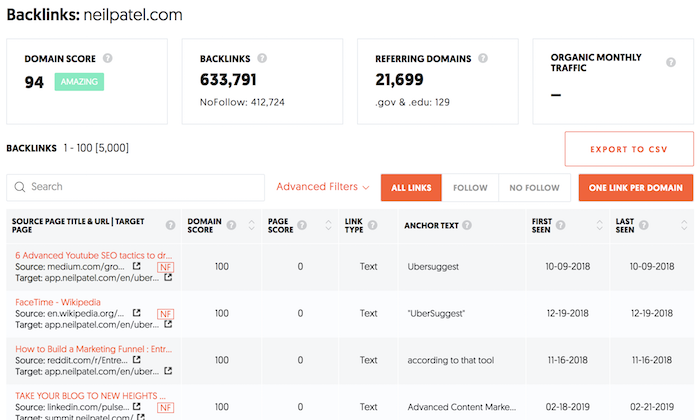
Then again, I have a domain score of 94 and I have 633,791 backlinks. Just look at the image above. (If you are curious what your link count or domain score is, put in your URL here.)

But if you have a lot fewer backlinks and a much lower domain score, what do you think would happen?

Chances are your content won’t get indexed fast and it won’t rank as high as you want.

But there has to be a way to change this, right? Especially without building more backlinks because we all know that’s time-consuming and hard.

To find the most ideal solution, I decided to run a little experiment.

Around five months ago, I sent out an email to a portion of my mailing list asking people if they wanted to partake in an SEO experiment.

As you could imagine, I had well over a thousand websites who were willing to participate. I had to narrow down the list because for this experiment to be effective, a website had to have a domain score of 30 or less and no more than 40 backlinks.

That way it’s at least a challenge to figure out how to rank new content higher.

In addition to that, the site couldn’t be a subdomain, such as domain.wordpress.com. It had to be a standalone site.

Once I removed all of the outliers, I was left with 983 people who agreed to participate in the experiment. Of those, 347 stopped replying or backed out of the experiment due to time commitments, which means I was left with 636.

How did the SEO experiment work?

For all of the sites, we had them write a piece of content. We didn’t make it a requirement that the content had to be about any specific topic or that it had to be written a certain way… we just had them write one piece of content that was between 1,800 and 2,000 words in length.

We enforced the minimum and maximum length limit because we needed the post to be long enough to naturally include keywords, but if it was too long… such as 10,000 words, it would have a higher chance to rank on Google.

Each site had 30 days to write the piece of content and publish it on their site. Within 30 days of the content being published, we looked up the URL in our Ubersuggest database to see how many keywords the post ranks for in the top 100, top 50, and top 10 spots.

We also repeated this search 60 days after the article was published to see if there were any major differences.

The Ubersuggest database currently contains information on 1,459,103,429 keywords from around the world in all languages (a lot of keywords have low search volume like 10 searches per month). But for this experiment, we focused on English speaking sites.

We then split the sites up into 9 groups. Roughly 70 sites per group. Each group only leveraged 1 tactic to see if it helped with rankings.

Here’s a breakdown of each group.

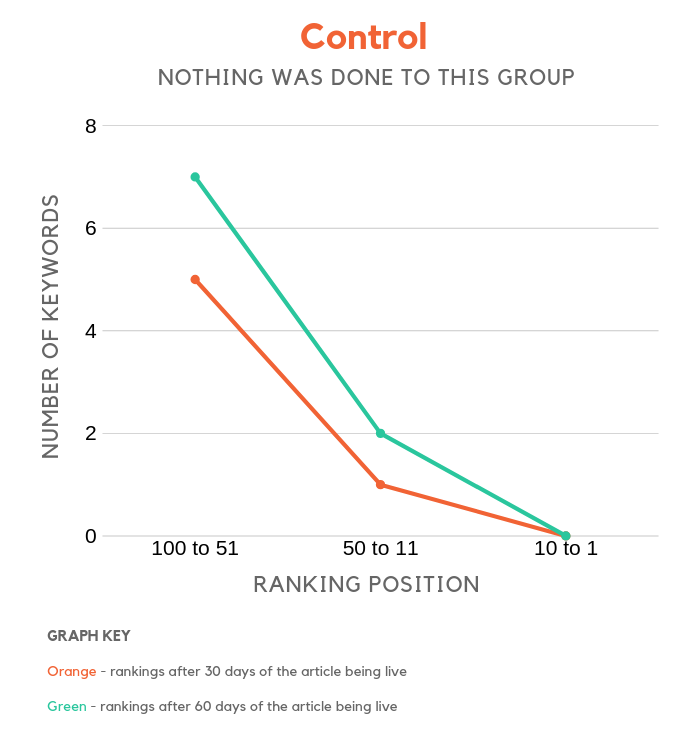
  1. Control group – this group just published the article and didn’t leverage any promotional or SEO tactics. Having a control group allows us to compare how specific tactics affect rankings.
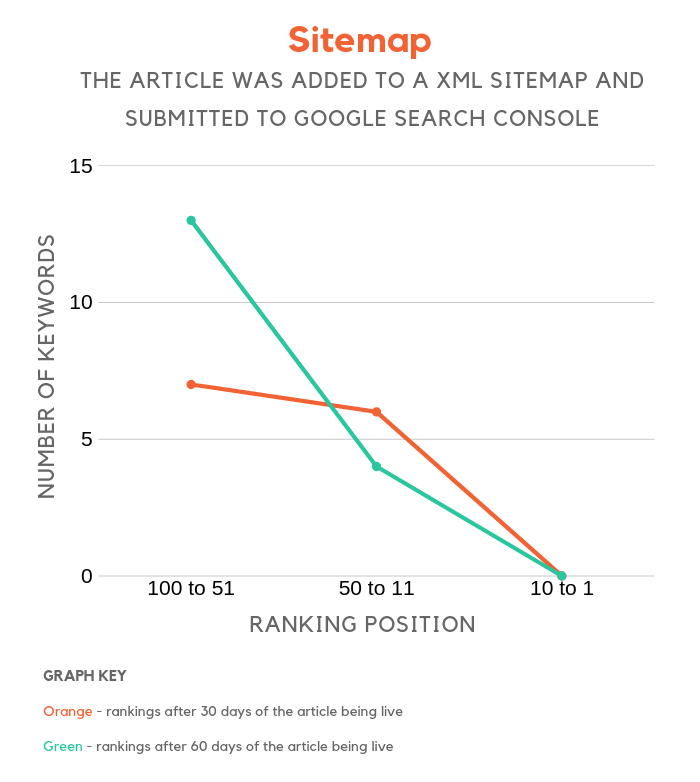
  2. Sitemap – all this group leveraged was a sitemap. They added the article to their sitemap, and we made sure the sitemap was submitted to Google Search Console.
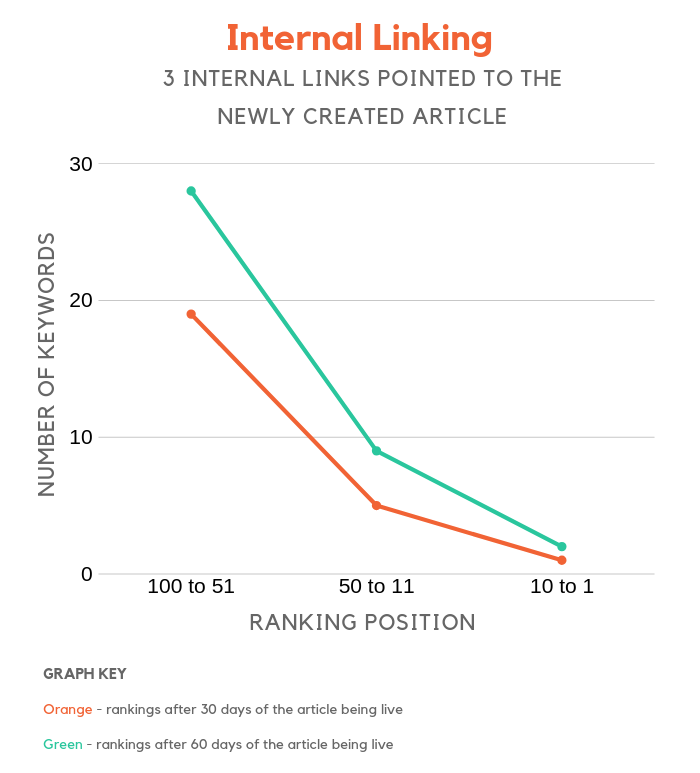
  3. Internal linking – this group added 3 internal links from older pieces of content to the newly written article.
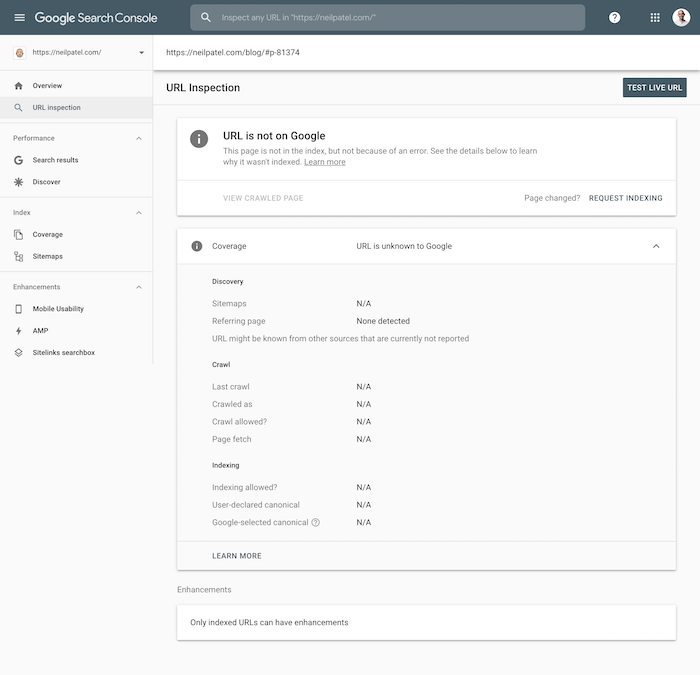
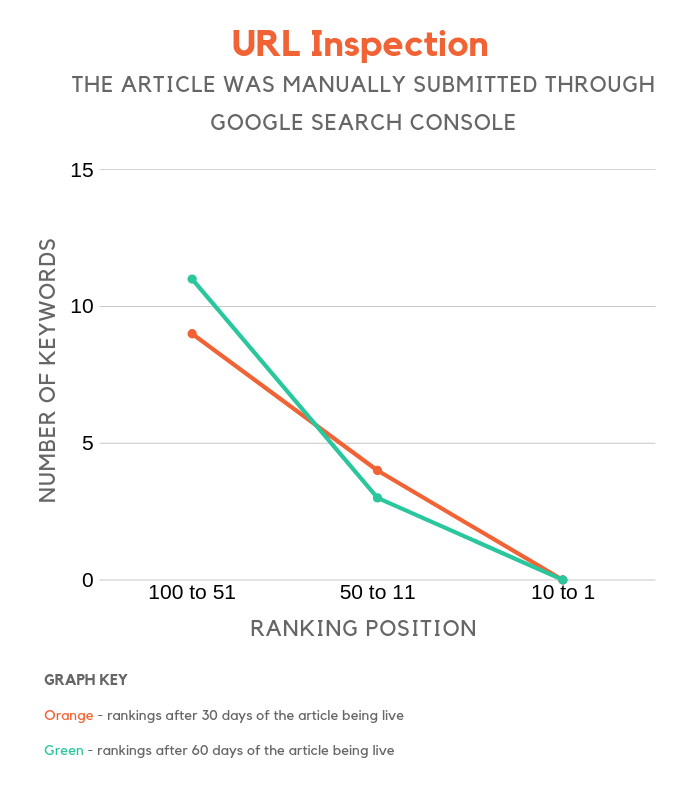
  4. URL Inspection – within Google Search Console you can request that they Crawl and index a URL. That feature is called URL Inspection.
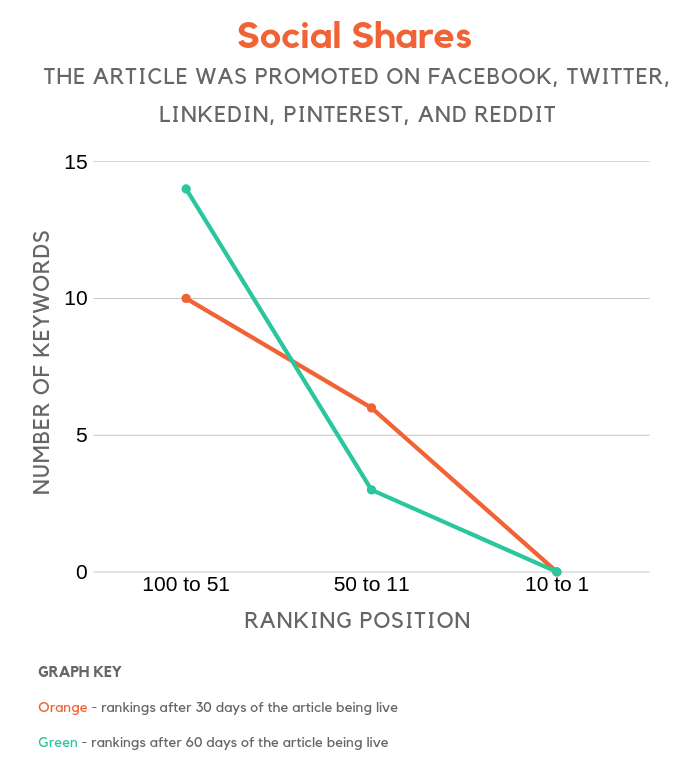
  5. Social shares – Facebook, Twitter, LinkedIn, Pinterest and Reddit were the social sites that this group submitted and promoted their content on.
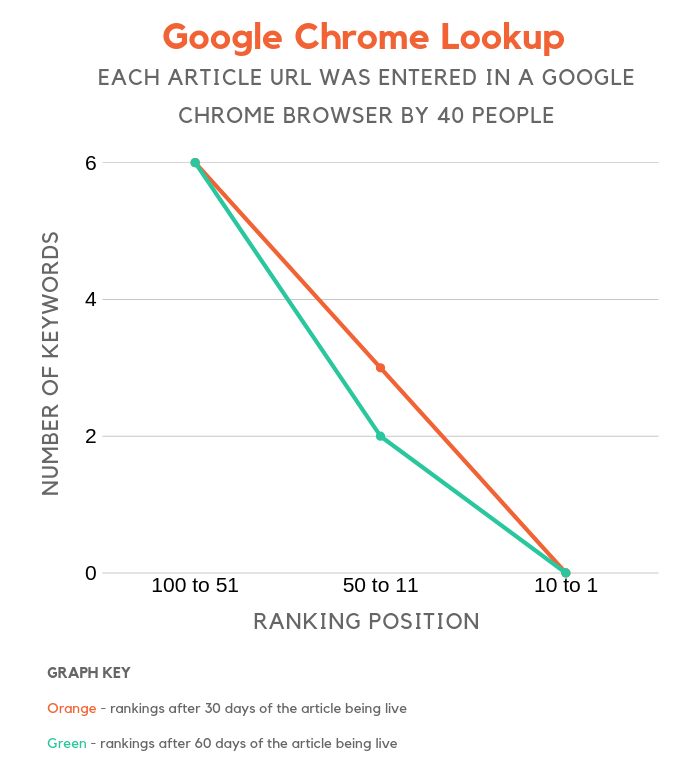
  6. Google Chrome lookup – for each site in this group, we had 40 people type in the URL directly into their address bar and look up the site. This could have been done on either mobile or desktop versions of Chrome. I added this group in there because I was curious to see if people visiting your site from Chrome browsers affects your rankings.
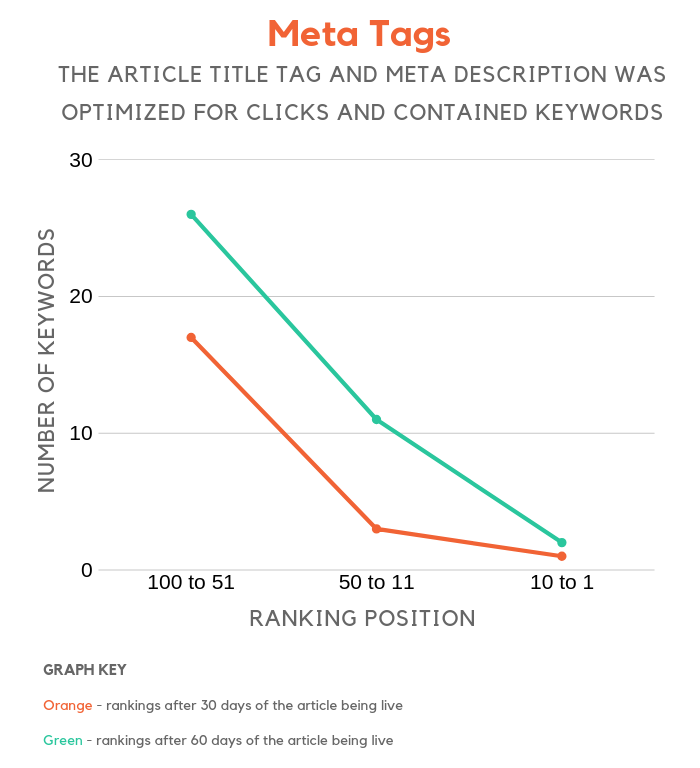
  7. Meta tags – my team optimized the title tag and meta description for everyone in this group. Based on the article, we crafted the optimal meta tags to not only include keywords but also to entice clicks.
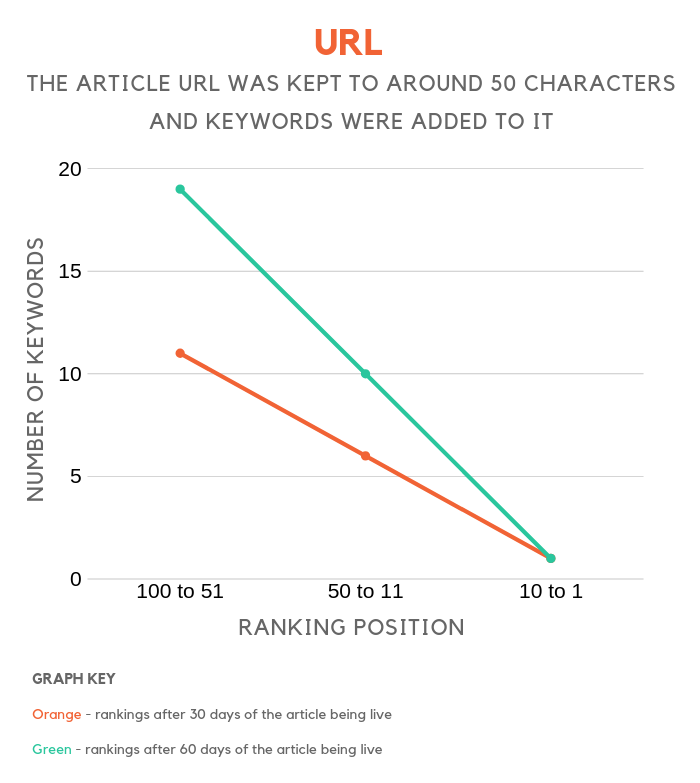
  8. URL – with this group we only optimized their article URL to include keywords and we tried to keep the length around 50 characters as that is what they supposedly prefer.
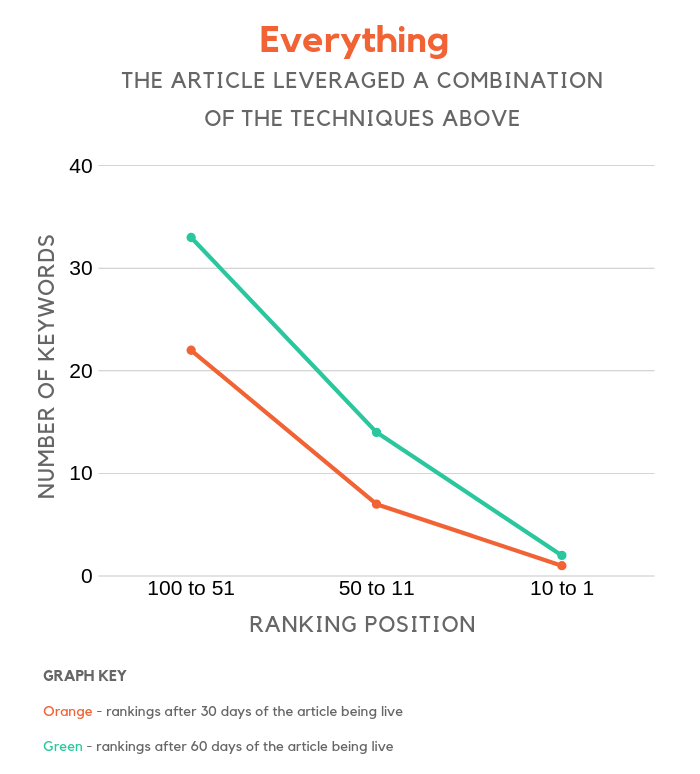
  9. Everything – this group combined all of the tactics above other than the control group as they didn’t do anything.

Before I dive into the data, keep in mind that if someone was in one of the groups, we did our best to make sure that they weren’t leveraging any other tactic. For example, for everyone who wasn’t in the sitemap group, we had them remove their existing sitemaps for Google Search Console (other than the everything group).

Control group

So how many keywords does an average website with a domain score of 30 or less rank for in Google within a month and even two months?

control

I was shocked at how many keywords a site could rank for when it barely has any links and a low domain score.

But what wasn’t as shocking is how a web page’s ranking can increase over time. The orange line shows the number of keywords that ranked within the first 30 days and the green line shows the number over the first 60 days.

Sitemap group

You know how people say you need an XML sitemap, well it is even more important if you have a low domain score. At least, that is what the data shows.

sitemap

When your site has very few links and a low domain score, you’ll find that Google may not crawl your site as often as you want. But by leveraging a sitemap, you can speed up the indexing process, which helps decrease the time it takes for your site to start ranking for keywords.

Internal linking group

Links, links, and more links… it’s what every site needs to rank well. Ideally, those links would be from external sites, but that’s hard to do. So, we tested how internal links impact rankings.

When you add internal links from your old content to your newer articles, it helps them get indexed faster and it helps push them up in the rankings.

Especially when these internal links come from relevant pages that have some decent rankings on Google.

internal links

Articles that leveraged 3 internal links had more page 1 rankings than sites that just used an XML sitemap.

URL inspection group

If you aren’t familiar with the URL inspection feature within Google Search Console, it’s a quick way to getting your content index.

Just log into Search Console and type in your article URL in the search bar at the top. You’ll see a screen that looks something like this:

url inspection

All you have to do is click the “request indexing” link.

url inspection

Leveraging this feature has a similar result to using the sitemap.

Social shares group

I’ve noticed a trend with my own website, in which if I create a piece of content that goes viral on the social web, my rankings for that new piece of content skyrocket to the top of Google… at least in the very short run.

And after a few weeks, I notice that my rankings drop.

Now, my site isn’t a large enough sample size and there are many reasons why my site ranks really well quickly.

Nonetheless, it was interesting to see how much social shares impact rankings.

social shares

Getting social shares substantially performed better than the control group, but similar to my experience with NeilPatel.com, the rankings did slip a bit in month 2 instead of continually rising to the top.

Social shares may not have a direct impact on rankings, but the more people who see your content the higher the chance you build backlinks, increase your brand queries, and build brand loyalty.

Google Chrome lookup group

Do you know how people are saying that Google is using data from Google Analytics and Chrome to determine how high your site should rank?

Well, I wasn’t able to prove that from this experiment.

I had 40 random people directly type in the URL of each new article into Google Chrome. I spread it out over a week, making sure they clicked around on the site and stayed for at least 2 minutes.

google chrome

The ranking results were very similar to the control group.

Meta tags group

Now this group performed very similarly to the group that leveraged internal linking. And the month 2 results outperformed all other groups.

meta tags

User metrics are a key part of Google’s algorithm. If you can create a compelling title tag and meta description, you’ll see a boost in your click-through rate and eventually, your rankings will climb.

If you want to boost your rankings through your meta tags, it’s not just about adding in the right keywords, you’ll also want to boost your click-through rate. Follow these steps to do just that.

URL group

The 8th group tested if URL length impacts how high a new piece of content ranks on Google.

url

Based on the graph above, you can see that it does. It didn’t have as much of an impact as internal linking or meta tags, but it did have an impact.

The key to creating SEO friendly URLs is to include a keyword or two and keep them short.

If your URL is too long and descriptive, such as:

neilpatel.com/blog/how-to-optimize-your-meta-tags-for-search-engines

The article will rank for very long tail phrases but will struggle to rank for more popular terms like “meta tags” compared to URLs like:

neilpatel.com/blog/meta-tags/

The beautiful part about the short URLs is that they rank well for head terms and long tail phrases.

Conclusion

The charts clearly show that little things like meta tags, URLs, internal linking, social shares, and even sitemaps help.

But the key to doing well, especially if you want your new content to rank well is to not just do one of those things, but instead do them all.

everything

As you can see from the chart, doing everything gives you the best results. Now sure, some of the things are redundant like using an XML sitemap and using the URL inspection feature, but you get the point.

You’ll also notice that when you leverage everything together your results aren’t exponentially better… SEO is competitive and has turned into a game where every little thing adds up.

If you want to do well and have your new AND old content rank faster and higher, you need to do everything.

I know the tactics above aren’t anything revolutionary or new, but it’s interesting to look at the data and see how specific tactics affect rankings.

So, what do you think?

The post How to Rank New Content Faster appeared first on Neil Patel.


* This article was originally published here

Tuesday, 4 June 2019

How to Crush Your Competitors With TF-IDF

How to Crush Your Competitors With TF-IDF

Posted by PJ_Howland

This post was originally published on the STAT blog.


Even if it’s not making People’s Sexiest Person of the Year, the benefits of TF-IDF for SEO are too unreal not to share. Which is why I'm sharing a breakdown of how to apply this under-used, underappreciated SEO tactic to help you win major traffic.

Read on to learn how to leverage TF-IDF and tools like STAT to get insight into what your competitors are up to and what high-quality, relevant content you need to create for searchers.

But first...

TF-ID-What?

TF-IDF stands for term frequency-inverse document frequency. It’s a text analysis technique that Google uses as a ranking factor — it signifies how important a word or phrase is to a document in a corpus (i.e. a blog on the internet). When used for SEO-purposes, it helps you look beyond keywords and into relevant content that can reach your audience.

It does this by doing two different things very well.

First, it tells you how often a word appears in a document — this is the “term frequency” portion of TF-IDF. Then, it tells you how important that term is, and it does this with “inverse term frequency,” which weighs down the words that appear frequently (such as “the” or “a”) and scales up the more unique words. This adjusts for the fact that some words appear more often than others and contribute little relevance.

This weighting score tells us how relevant our keywords are, which is cool in and of itself, but especially handy when you apply it to SEO.

Why SEOs should care about TF-IDF

Google is smart. It knows when you’re trying to find the name of the song you can’t get out of your head and also when content isn’t valuable or is teetering on the verge of spammy. It does the latter through its all-powerful algorithm, which actually includes a TF-IDF-like analysis to ensure that content is relevant to the topic being searched.

This is key for SEOs, because while Google has gotten pretty good at thinking like a human, it’s still just an algorithm that is constantly refining its metrics. And while we know some of those metrics, some of the metrics Google uses we might not know, and those can be things like the right words being used in an article.

So, whether you’re hoping to get a wider reach with your content, increase traffic without getting penalized by Google, or know what Google qualifies for the top SERP spot, you need to do what Google does — you need to get your TF-IDF on.

How to conduct a TF-IDF analysis

Basically, you need something to uncover the semantic relevance of words. TF-IDF will help you get an idea of what content Google values in sites that are performing really well.

Google understands the exact metrics that drive user engagement and does a pretty good job of indicating whether or not searchers are pleased with a result. And the good news? Leveraging TF-IDF can give you insight into those metrics. You’ll see what your competitors are up to, but also get an idea of what high-quality, relevant content you need to create for your searchers.

Let’s say I have a client in the health and wellness space who has content they want to rank for the keywords “coconut oil.” I know that traditional keyword research will reveal words like “coconut oil uses,” “benefits of coconut oil,” and “coconut oil for hair.” But I also want to know what topics are being commonly discussed by other high-ranking articles.

To find out, I simply take a curated keyword list and plug it into STAT to see the top ten pages that rank for my client’s keywords.

Once I have the top ten sites, I can export all that data from STAT into any tool of choice. I prefer to use Ryte, which analyses the site’s pages for my keyword of choice — in this instance, “coconut oil” — and then calculates the TF-IDF value. The results will provide me with a way to compare the content on my client’s page with their competitor pages. From there, I can choose which keywords have a higher search volume and lower competition.

Standard keyword research shows us what people are searching for when they’re looking for coconut oil. What it won’t reveal are the related keywords and themes that your competitors are using in their articles. Which means your content, no matter how well-articulated, risks going unseen.

A TF-IDF analysis for “coconut oil,” on the other hand, will reveal words that are semantically related to your keyword.

Don’t be surprised if what it surfaces is a bit of a head-scratcher. Remember: TF-IDF won’t reveal words like your keyword. It’s going to reveal words associated with your keyword. For instance, my keyword, “coconut oil,” surfaced “diaper rash.” Who’da thunk?

But that’s what great about TF-IDF — it’s giving you the topics that Google has deemed important, so you get that extra layer of clarity to create better content and rank higher on the SERPs.

Next steps: Comparing results

Now that I know that “diaper rash” and “coconut oil” are (apparently) hot topics, my next step is to understand how this, and other highly scored TF-IDF results, compare against the top 10 URLs that my health and wellness client is competing against.

To figure this out, I simply plug my client’s competitor URLs into Ryte and with one click of a button, a detailed breakdown populates, depicting which of my highly-scored keywords my client’s competitors are using and how frequently they’re appearing in their content. This will help me determine my next steps.

For instance, if my client wants to up their chances of claiming the top spot on the SERPs, then they best be thinking about how to incorporate “diaper rash” in their content, since its high search volume clearly indicates that this is what the searchers are after.

Or, I can also suggest that my client goes after the low-hanging fruit, snagging only the high search volume keywords that have low competition. This would help them jump the ranks faster since they wouldn’t be battling it out with big brands over those high-ranking keywords. Either strategy is viable and will help my client improve their topic relevancy.

Remember, though. If it doesn’t make sense for your page, don’t use it. Once you uncover why TF-IDF is uncovering words XYZ, find a content strategy that will authentically place those words into your article.

The benefits of TF-IDF

The cool thing is that once you've optimized your content, it’s usually very quickly that your keyword rankings go up. Better keyword ranking is always going to mean more traffic, more traffic means time-on-page and conversions, and more dollars in the pocket, and that’s something that I think we’re all here for.

Another added bonus of TF-IDF analysis is that it drastically levels up your featured snippet game. Like, a lot.

That's because content that has undergone a TF-IDF analysis helps prime pages for featured snippets — it includes the words and phrases that Google already wants to see in order for it to be a qualifier. So, if you were also hoping to cross grabbing snippets off your bucket list this year, then TF-IDF may be your new bestie.

Take all that data and track it

Once I'm done optimizing my content with keywords I know that Google (and searchers) want to see, I can track their performance over time in STAT. This lets me know if my strategy has been successful. 

For instance, I can look at new pages to see how they are performing. If I want to do some additional A/B testing, I just segment my keywords into meaningful tags, such as keywords from my core keyword research and related terms (from our TF-IDF analysis). This helps me easily compare how the ranks are differing between the pages I've optimized with TF-IDF results and the pages that I didn't.

And that's it! 

Do you have any neat-o TF-IDF strategies? Share them with me in the comments, below!


Sign up for The Moz Top 10, a semimonthly mailer updating you on the top ten hottest pieces of SEO news, tips, and rad links uncovered by the Moz team. Think of it as your exclusive digest of stuff you don't have time to hunt down but want to read!


* This article was originally published here

Monday, 3 June 2019

The Case for Pinpoint Local Tracking

The Case for Pinpoint Local Tracking

Posted by TheMozTeam

Not so long ago, tracking a “United States” SERP could give you an accurate depiction of what a searcher would see, regardless of where in the country they were. Now, unless a searcher is actively hiding their whereabouts, Google always knows where they are and serves results that are heavily influenced by their precise surroundings.

In other words, the “national” or “market” level SERP is dead. Long live the “precise location” SERP.

Of course, even though we know this to be true, we wouldn’t be us if we didn’t validate with a little (a lot of) data — when it comes time to set up your keyword tracking strategy, we want you to care as much about location as Google does.

Setting up the SERP comparisons

Since proper keyword segmentation is essential to making sense of your SERP data (and more than one data point is always preferable when proving points), we divvied up our queries into two different categories:

  1. General intent keywords. These are searches that could be satisfied without ever having to leave the house, unless you don’t want to pay for shipping — like [mountain bike], [laptop speakers], and [FIFA 19 PS4].
  2. Local intent keywords. These are searches that clearly require physical locations — like [best mechanic], [vegan restaurants], and [24 hour gym].

Then came the tracking. We took each group of keywords, stuffed them into STAT, and tracked them in the centre of specific Portland and New York City ZIP codes, as well as in the US, English-speaking market as a whole. So, for example, one SERP is located to “10038 New York, NY” and the other is only located as far as “US-en.”

Once we’d gathered all our SERPs (just over 600,000 of them), we did a bunch of side-by-side comparisons. We went keyword by keyword and looked at whether search results were present on both the ZIP code and market-level SERPs, and then if they appeared in the same order — is it here? Is it there? Are they both in rank four?

The answer to all of the above is: Yes, yes, and yes, okay, similar.

But the biggest question on our minds: Are market-level SERPs accurate enough to trust?

General intent keywords

Diving into our general intent keywords first, we were surprised to find a somewhat high similarity between ZIP code and market-level SERPs.

For starters, they shared 83 percent of their top 20 organic URLs. Of course, while this is higher than we expected, it still means that if we track our keywords without putting a searcher somewhere on the map, we kiss 17 percent of real-life search results goodbye, which is a lot.

What important insights might we lose out on — are we ranking and don’t know it? Are we letting a competitor sneak up on us?

Result type Similarity: NYC vs. no location Similarity: Portland vs. no location
Organic    83.11% 83.14%
SERP features 73.69% 67.02%

Looking at whether or not any of those results showed up in the same spot from one SERP to the next, things got even more concerning. Only 28 percent of organic results appeared in the same ranking position on both the local and national SERPs. So, even if we decide that doing without 17 percent of the results that our searchers see is fine by us, we can’t depend on the rank of the results to be accurate.

Moving our attention over to SERP features, we found that only 70 percent appeared on both ZIP code and market-level SERPs, which is less than the organic results. Local packs are a good example of just how much you can miss. 31 percent of Portland’s SERPs and 27 percent of NYC’s returned a local pack, whereas only 12 percent of national SERPs produced one. So, even though these keywords don’t necessarily require a physical location, when Google knows that there’s a real searcher standing in a real spot, it will err on the side of local intent and adjust its results accordingly.

As for the similarity of SERP feature rankings, they were only marginally more consistent than organic results with 33 percent appearing in the same position from SERP to SERP — hardly enough to make up for the increase in incorrect results.

Local intent keywords

Next, it was time to look at our keywords with explicit local intent — how were they faring?

The answer was: worse. Much, much worse. Remember how we could count on about 83 percent similarity for our general intent keywords? Here, national and ZIP code SERPs were only 32 percent similar when we compared the organic results on each.

Result type Similarity: NYC vs. no location Similarity: Portland vs. no location
Organic    33.35% 29.94%
SERP features 23.46% 20.09%


So, if we only track at the national level for queries that are searching for local businesses, we get a SERP where 68 percent of its results are different from what a searcher actually sees. Things took another dramatic turn when we compared ranking positions: only four percent of organic results had the same rank.

And just like before, similarity took a big hit when it comes to SERP features. Market and ZIP code-level SERPs only share around 22 percent of SERP features, and just over nine percent showed up in the same rank.

Think about something like the jobs result type from Google’s perspective, which is very specifically meant for hyper-local audiences. If you type [jobs] into Google (because this SEO business is just too much) and it doesn’t know where you are, what’s a search engine to do?

Not give you accurate local job listings, that’s what.

Tracked location % of SERP appearances
97204 Portland 0.09%
10038 New York 0.10%
US-en market 0.01%


As you can see above, only 0.01 percent of our market-level SERPs returned a jobs result type compared with 0.09 percent of our Portland SERPs and 0.10 percent of our New York SERPs.

Key findings and takeaways

So, what does all of this mean?

  • Keyword intent is the biggest factor to consider when setting up your tracking. If you only care about whether you’re seeing roughly the same URLs as your searchers, you could get away with tracking more general intent keywords at the national level. Keywords with hyper-local intent that are tracked at the market level produce such disparate SERPs from the real world that you just shouldn’t do it.
  • Ranking order cannot be trusted on market-level SERPs. Regardless of your keyword intent, if knowing where you and your competitors rank on a SERP is important to you, location tracking is the only way to go.
  • SERP features are more subject to a searcher’s location than organic results. For both keyword sets, localized SERPs share less features in common with their market-level counterparts. So, if SERP features are on your agenda, these highly personalized features are best tracked from a highly-specific location. Especially if local packs are your jam.

To sum: you need to track hyper-locally if you want to nab accurate results. After all, one SERP that searchers actually see in the hand is worth two make-believe market-level SERPs in the bush.

Want a detailed walkthrough of STAT? Say hello (don’t be shy) and request a demo.


Sign up for The Moz Top 10, a semimonthly mailer updating you on the top ten hottest pieces of SEO news, tips, and rad links uncovered by the Moz team. Think of it as your exclusive digest of stuff you don't have time to hunt down but want to read!


* This article was originally published here

Sunday, 2 June 2019

Is Google's Redesign Good for Ads or Brands?

Is Google's Redesign Good for Ads or Brands?

Posted by Dr-Pete

At the end of last week, Google announced a major design change for mobile search results. Minor design tests and changes happen frequently, but this roll-out included two major changes. First, the green [Ads] indicator was replaced with black, bolded text ...

Below is the new ad format in a local pack result. Note that I've removed the surrounding design elements (including rounded boxes) to focus on the elements that have changed ...

Reactions from the marketing community were swift and often sarcastic, but one reaction clearly missing was surprise. Google has been moving to make ads look more like organic results for years.

Has Google finally gone too far?

Does this latest change do too much to blend ads and organic results? If we just go back one iteration, it doesn't seem like a huge shift. The most recent version, shown below, also matched the color of the "Ad" marker to the display URL, substituting a thin rounded rectangle for the newer, bolded text ...


Compare both 2019 versions to a desktop ad from 2017 ...

The mismatched color and white-on-yellow block stand out quite a bit more than the two most recent treatments. If we go back to 2013, the evolution is much more obvious ...

For years, Google ads were displayed in a single block, clearly separate from organic results and with a distinct background color. While that color changed over the years, even this subtle background tied the ads together and separated them clearly from other result types.

What about organic results?

Unlike some previous ad redesigns, this change arrived with a redesign of organic results. Here's what an organic result for Moz's Algorithm History looked like on most mobile devices last week ...

While fonts and sizing and the surrounding UI have changed over the past couple of years, the core placement has been the same: (1) display title, (2) display URL or breadcrumb, and (3) snippet. Like the new ad format, the new organic format flips lines (1) and (2) ...

The new format also adds a small version of the site's favicon. Google seems to also be shifting toward showing the brand name, when available, versus the site's root domain, but this is another change that Google has moved gradually toward over the recent past.

When do the lines blur?

While Google isn't using the exact icon we'd prefer at Moz, the square, color-filled logo representation is clearly pretty different from Google's black "Ad" marker. Some brands aren't so lucky. Consider these two results for Adidas.com ...

The Adidas logo doesn't render well at this size, and ends up looking like a black triangle, which may be hard to distinguish from the "Ad" text at a glance. Associated Press has a similar problem ...

At this size and resolution, "AP" could arguably be mistaken for "AD". For well-known brands, this may not pose a problem (the AP logo is fairly recognizable), but it could impact click-through rates on smaller brands.

These are extreme examples, of course, but in the previous iteration (the green "Ad" text in a rounded rectangle) there was no analogous text or shape for organic results. The addition of a favicon to organic results adds an element that could mirror the "Ad" text in paid results, creating potential confusion.

Should I update my favicon?

Marketers were quick to brainstorm ideas and more than a little mischief over the weekend. That may be fun for a while, but Google has already pushed back on manipulating favicons and posted their guidelines. Long story short, manipulative, inappropriate, or constantly changing favicons are probably going to be removed.

If you don't have a favicon, Google will serve up a default. Here's an example from my personal site:

The default icon isn't terrible, but if you don't currently have a favicon, it's worth putting one together that matches your branding. Google currently recommends providing a favicon at 48X48 pixels (or a multiple of 48). There are many free tools on the web to convert standard graphics formats to a favicon (.ico) file.

I created a new favicon on Tuesday, May 28, and resubmitted the home-page to Google Search Console. The updated favicon appeared the morning of Thursday, May 30 (just under two days) ...

Anecdotally, most people are reporting favicons being updated in a day or less. My personal site has some mobile-friendly errors, which could have caused delays, but there are currently no errors or updates within GSC to tell you when to expect your favicon to appear in search results.

Is Google's future brand-first?

It's easy to get hung up on the ad changes, but by moving the brand or domain to the first line and adding a favicon, this design reflects a brand-first approach, an emphasis of brand and site over specific content. Reading between the lines of Google's announcement, this design shift makes it clearer that everything in the "card" (the search result container, essentially) belongs to a single brand. Consider the Moz blog, for example:

The wrapper makes the card a bit more apparent, but by leading with the brand, the new design makes it clearer that all of these elements — the organic result, site-links, and blog posts — are tied to a single source. Taking a brand-first approach may also be a part of Google's larger strategy to combat false information and help searchers attribute content to its source.

Of course, like all changes, we don't know how long this one will last. Like most major design shifts, we can assume that Google has been testing this one for some time, but if favicons are manipulated or abused to the point that automation can't handle the problem, they may have to change course.

For now, I'd make sure your favicon accurately reflects your brand and doesn't look too similar to the black "Ad" text. Ultimately, you want your organic listings to positively represent your brand and drive relevant clicks. While these changes are unlikely to impact rankings, I would recommend monitoring your click-through rates (CTRs) on both major organic pages and paid results. It may be some time before we fully understand the impact of these changes.


Sign up for The Moz Top 10, a semimonthly mailer updating you on the top ten hottest pieces of SEO news, tips, and rad links uncovered by the Moz team. Think of it as your exclusive digest of stuff you don't have time to hunt down but want to read!


* This article was originally published here
Saturday, 1 June 2019

How to Make Money with SEO in 2019 - Whiteboard Friday

How to Make Money with SEO in 2019 - Whiteboard Friday

Posted by randfish

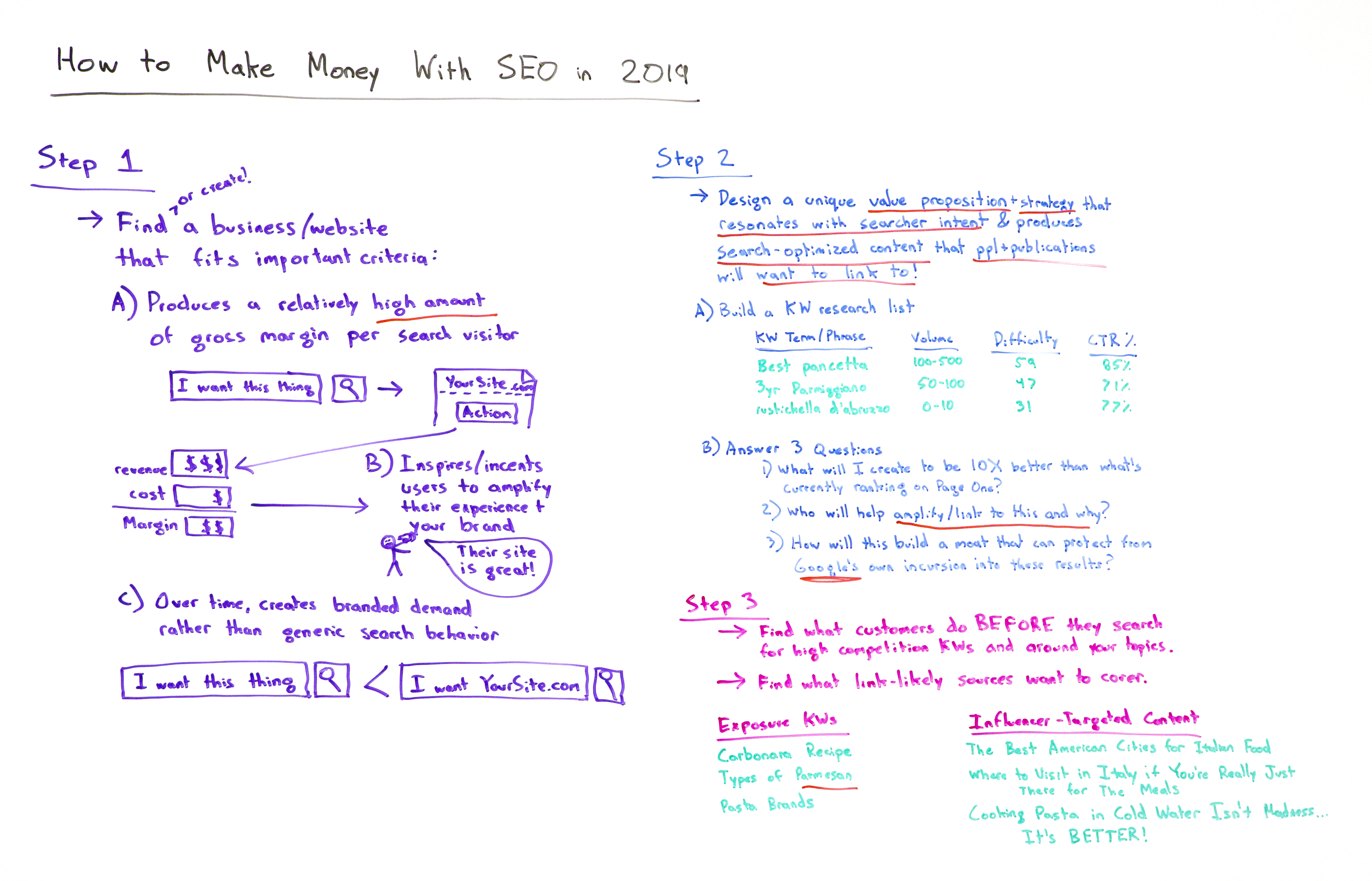
Making money with SEO today is nowhere near the same practice it was in 2009. Sketchy, manipulative practices and simple, straightforward tweaks no longer do the job — to be successful in 2019, you need to be smart, strategic, and in tune with what searchers want. Rand Fishkin outlines three steps you need to have down if your goal is to improve your bottom line with the help of SEO.


Click on the whiteboard image above to open a high-resolution version in a new tab!

Video Transcription

Howdy, Moz fans, and welcome to another edition of Whiteboard Friday. This week we are talking about how to make money with SEO. Now, for many of you who might be watching this video because perhaps you have googled or searched on YouTube about how to make money with SEO, well, what I want to do is talk about how that practice has changed dramatically in the last 10 years.

In 2009, if you were searching for how to make money with SEO, there were a lot of sketchy and manipulative and actually relatively simplistic, straightforward things that you could do to make money online with SEO, and that has changed. That is not the case anymore, and I think this is why you see so many people who are in worlds like affiliate marketing and the worlds of creating small websites and many networks of small websites and trying to sell relatively simplistic, unbranded products or services or advertising revenue, that a lot of those sites have disappeared. Certainly part of that is because the margins on many of those products has gone way down. Some of it is big competition from many new entrants, including big companies like Amazon, but many others as well.
A big part of this is the way that you think about making money online and how you might be able to use SEO to do that. Now if you are not one of those folks who's trying to do that and you are instead a professional marketer, I still think this video is going to be very valuable for you because there are a few key sources of change that have been brought to our industry by what Google has done and what websites have done and how users behave that shift a lot of this thinking. So stick with me.

Step 1: Find (or create!) a business/website that fits important criteria

If you want to make money online in the SEO world in 2019, your general step one is to either find and buy or create a new business or a website that fits some important criteria or to modify a website you've already got to fit these important criteria. 

A) Produces a relatively high amount of gross margin per search visitor

The first one is you want a relatively high amount of gross margin per search visit. This is fundamentally different from the past. In the past, I knew plenty of people who built their living in the SEO world with, "A visitor is worth a penny to me. A visitor is worth a hundredth of a penny to me, but it doesn't matter because I can make up for it in volume." But today, earning search visitors is so much more challenging than in the past, especially for a new website or an emerging one or a startup, that I believe you need this high gross margin to be able to do that.

So you want to find people who are searching for a variety of things. I want this thing. Do a search. Come to your site. Take an action of some kind. That could be sign up for an email list. It could be view some advertising. It could be actually buy a physical product or buy a software product, whatever it is. You make revenue that is significantly more than the cost of serving that customer, the cost to you of maintaining the website, doing the marketing, your time and hours and whoever else you employ, keeping the lights on, paying the bills and the taxes, and the product itself, whatever you're shipping or whatever you're creating and serving, software, advertising, etc.

B.) Inspires/incentivizes users to amplify their experience and your brand

Then it inspires and incentivizes users to amplify their experience and as a result your brand. You might say like, "Well, why do I need that? Why do I need someone who's going to go and share?" Not every visitor, but you need a certain percent of people to go and say, "Gosh, their site is great. I am going to post about it on my social media. I'm going to link to it. I'm going to talk to my friends about it. When people see this thing that I've made, I'm going to say, 'Oh, it came from such and such place.'" You need that because these types of online and offline word of mouth and amplification is core to a business' survival on the web, and that is fundamentally different than 10 years ago.

Ten years ago you could do a lot of sketchy, spammy, manipulative stuff to earn links and to earn rankings. Google has removed almost all of that ability for 99% of websites, especially in the English language world. If you are operating in other languages, especially where Google's Web Spam Team has not done as well, there's still some more of those opportunities. But generally speaking, this is crucial. You need people who are going to link to you and amplify you.

C.) Over time, creates branded demand rather than generic search behavior

You need a business that fits the criteria of over time it creates branded demand rather than generic search behavior. Why? Because otherwise you do not create a competitive advantage that is sustainable with time, and other people who do will certainly recognize that and enter your field and compete with you and put you out of business.

"I want this thing" is a fine search phrase to target for your SEO. But you know what's way easier? "I want yoursite.com." When you have people searching for your brand and your branded products or the keywords that they were searching for generically plus your brand as a word in there, what they're saying is, "Google, don't serve me up just any result. Take me to that website." That is a competitive advantage, a barrier to entry that has huge amounts of protection for you as a business owner.

Step 2: Design a unique value prop/strategy that resonates with searcher intent & produces search-optimized content that people want to link to

All right, step two. You've found a business that fits these criteria or you've created one or you've modified your business such that it does this. Great. Now you need to design a unique value prop and a strategy that does a couple of things. It's got to resonate with searcher intent, meaning you are serving what searchers actually want rather than just serving searchers with what you want them to do but that does not actually serve them. This is because Google has gotten too sophisticated about being able to match searcher intent with the keyword phrases and rank the sites that solve the searcher's problem.

Ten years ago, that was not the case. Ten years ago, in 2009, someone could search for "best pasta," and you could serve them up a site that tried to sell them a certain kind of pasta as opposed to comparing a bunch of different brands and varieties and trying to truly serve the searcher's intent. That's almost impossible today. There are a few exceptions, but those gaps are closing rapidly.

It also needs to produce search-optimized content that people and publications want to link to. Totally different from 2009, when you could manipulate the link graph, acquire links in ways that searchers didn't necessarily love, but Google would put you on top anyway and you could sort of take advantage of that for a while. Not the case. Now you need people to want to link to you, to have a reason to link to you. Otherwise, you will not be able to get those top ranking positions.

A.) Build a keyword research list

So first, build a keyword research list. You can use Moz's Keyword Explorer, which is what I personally use. But there are many keyword research tools out there on the web. You can type in phrases. I love Italian food, so I'm using examples like that, so "best pancetta," "3-year aged parmigiano," "Rustichella d'Abruzzo," which is like this pasta variety that I personally think is the best one out there. There's search volume, there's difficulty, and there's click-through rate percentages. So I'm building this list. You can go check out the videos on keyword research if you want to dive deeper on this. 

Start your keyword research list

B.) Answer 3 questions

But essentially I want this list because I want to be able to answer some questions about the search phrases and terms that I'm targeting with my business.

1. What will I create to be 10X better than what's currently ranking on page one?

First, what will I create to be 10 times better than what's already ranking on page one for these terms? If I search for "best pancetta" and I cannot come up with a way that I think I could outperform, have a better web page than what everyone else has got there, what's my competitive advantage? How am I going to take that over? You better come up with those things. I need those answers for the crucial terms and phrases that I'm going after, that are going to bring me the gross margin dollars that I need for my product, my services, my advertising, what have you.

2. Who will help amplify/link to this and why?

Second, when I produce that content, who will help amplify or link to this and why? Who will help amplify this and why? If you don't have a great answer to that question, don't publish the piece. Wait until you do. Find that great answer, because you need that amplification in order to perform, especially in the earliest stages. Once you have lots of links, high domain authority, lots of visibility in Google, you can put a lot of things out there on the web and basically coast on your brand's strength and the fact that Google already likes your domain and is going to bias toward you. But in the early stages, when you have a new business, not the case.

3. How will I build a moat that can protect against Google's own incursion into these results?

Third, how will I build a moat around this business that can protect from potential incursions by Google themselves? If you look at the search results today versus 2009, you will see a dramatic difference, which is that Google's results, from Google Maps to Google's own instant answers to their featured snippets to their tabs and systems where they try and answer a query fully with their own stuff, Google Travel, Google Flights, Google Hotels, the list goes on and on and on and on, they are taking away a lot of that opportunity, and you need to have a way to protect yourself from that. One of those ways is certainly branded search. Another way is to make sure that the words and phrases that you're going after, especially early on, are not ones where you have to compete with Google themselves.

Step 3: Find what customers do before they search for high-competition keywords/around your topics

Step three, finally, find what customers do before they search for these high-value keywords to you, high competition keywords around your topics. What do they search for before they get to that? What do they search for around that stuff? How can I capture this customer prior to that money search? Then I can create a new keyword research list and a new set of content that I'm going to create to target those people, which will be vastly easier to capture them earlier in their buying cycle, earlier in their potential funnel.

Exposure keywords

So exposure keywords would be things like "carbonara recipe." Someone's going to search for carbonara and how to make it before they ever look up, "Now, where do I get pancetta?" This one potentially is easier to rank for than this one. This may be an imperfect example. But "types of parmesan" -- first off the English American spelling -- versus "3-year aged parmigiano," this is a transactional keyword. I know what I want. This is an "I'm still learning about this" thing. You're going to need content in both of those worlds.

"Pasta brands," I'm learning. "Rustichella d'Abruzzo," I know what I want. Got to serve both.

Influencer-targeted content

Finally, as part of step three, you want to find what link-likely sources are willing to cover. What is going to be the thing that gets you the amplification? Sometimes it's not the same thing as the exposure keywords or the money keywords. So you need content that is going to affect influential publications and people, things like, "Okay, we're going to produce a piece. It doesn't necessarily serve a lot of searchers, but we know we can get links to it. We know people will tweet about it. We know they'll post to their Facebook page. We know they might talk about it on Instagram."

"The best American cities for Italian food," ooh, competition between American cities, whoever it is, whatever, Philadelphia, we put them low in the rankings. New York, we put them high in the rankings. They're going to fight about it relentlessly. Tons of people are going to talk about it. The "New York Post" is going to write about it. "The Philadelphia Inquirer" is going to be all pissed about it. Great.

"Where to visit in Italy if you're really just there for the meals." Hmm, that's the kind of thing someone would cover. "Cooking pasta in cold water isn't madness. It's better." What? I actually do this, by the way. I do recommend starting pasta in cold water. We'll talk about that in another episode when I have my cooking set up here. But regardless, the idea behind this is that I have influencer and publication targeted content in addition to exposure keywords and money keywords.

This sort of strategic thinking is how you can make money with a new business, a new website in 2019, and it is vastly different from what you saw 10 years ago.

All right, everyone. I hope you've enjoyed this. Look forward to your comments. We'll see you again next week for another edition of Whiteboard Friday. Take care.

Video transcription by Speechpad.com


Sign up for The Moz Top 10, a semimonthly mailer updating you on the top ten hottest pieces of SEO news, tips, and rad links uncovered by the Moz team. Think of it as your exclusive digest of stuff you don't have time to hunt down but want to read!


* This article was originally published here